CRM Automation in 2026: A Full Operator Field Guide
CRM automation in 2026: the four jobs worth automating inside your CRM, the rule that keeps it from scaling chaos, and how to turn admin into revenue.
CRM automation in 2026 is the difference between a CRM that feels like an admin tax and one that works like a revenue engine, and the gap between the two is which busywork you let the system handle. Left manual, a CRM asks reps to log emails, update stages, assign leads, and create follow-up tasks by hand, the exact work that gets skipped under quota pressure, leaving the pipeline data stale and the forecast unreliable. Automated well, the same CRM (whether Salesforce, HubSpot, or another) routes leads instantly, logs activity in the background, triggers the next task off deal events, and keeps records clean without anyone remembering to do it, so reps spend their time on conversations instead of data entry. The payoff is concrete: teams report saving around 12 hours per rep a week, cutting data-entry time by roughly 30 percent, and CRM systems returning an average of 8.71 dollars for every dollar invested.
That framing matters because the goal is not to automate everything but to automate the right busywork without scaling the wrong logic. The danger, and the rule that separates teams who win from teams who create a mess, is that automation amplifies whatever process it runs: automate a broken lead-scoring model or a workflow nobody actually understands, and you do not save time, you scale chaos faster. This guide lays out the four jobs worth automating inside the CRM, the discipline that keeps automation from backfiring, and the order to roll it out, so the system finally works for your reps and your B2B prospecting rather than against them.
This is a practical guide that sits across the sales automation and crm software clusters, building on the best sales automation tools landscape and the b2b sales workflow automation guide. It runs on top of the system of record you choose in the crm software pillar.
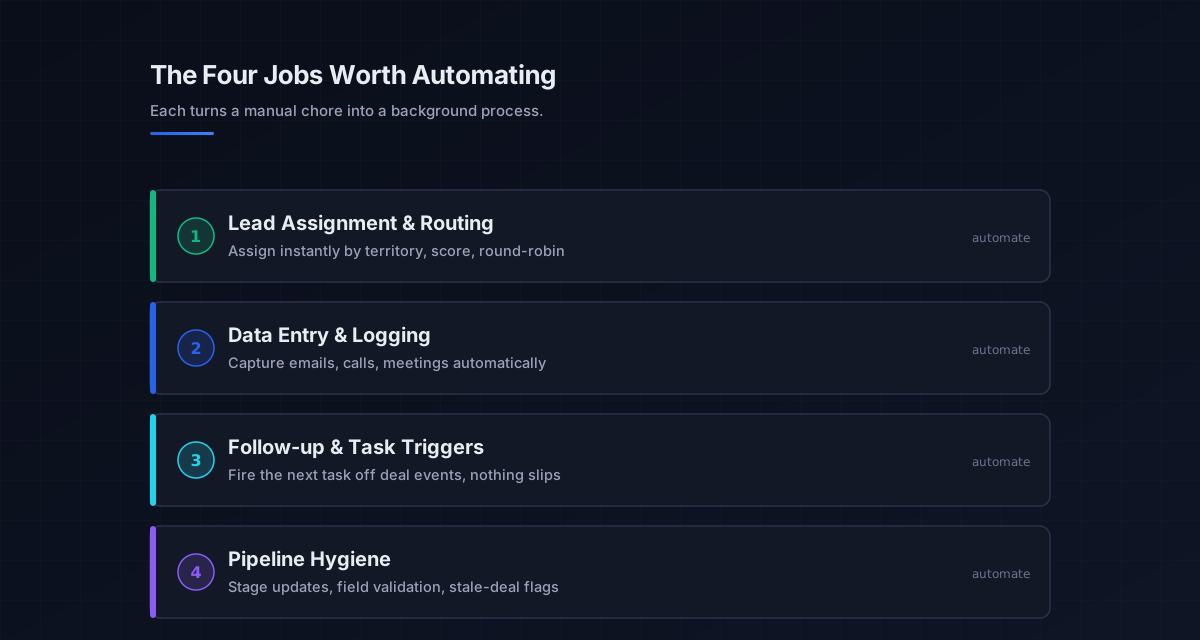
The four jobs worth automating inside the CRM
Before turning anything on, name the jobs, because effective CRM automation, or CRM workflow automation, is not one big switch but four distinct categories of busywork, each a place where manual work quietly leaks time and data quality.
Lead assignment and routing is the first and highest-leverage job: instead of leads sitting in a queue waiting for someone to claim them, automated rules assign each one instantly by territory, score, round-robin, or expertise, which wins speed-to-lead and eliminates leakage. Data entry and activity logging is the second: the CRM captures emails, calls, and meetings automatically rather than relying on reps to log them, which is the work most often skipped, so records stay current and the pipeline reflects reality. Follow-up and task triggers are the third: a completed demo with no booked next step, a deal gone quiet, or a contract sent all fire the right task or sequence automatically, so nothing falls through. And pipeline hygiene is the fourth: stage updates, field validation, and stale-deal flags keep the data clean in real time, which is what makes the forecast trustworthy. Each job converts a manual chore into a background process, and each is a candidate to automate one at a time.
Lead routing and data entry: the two biggest wins
If you automate only two things, make them lead routing and data entry, because they deliver the fastest, largest returns. Automated lead routing assigns leads the instant they arrive, by layered if-then rules combining territory, score, and product interest, so follow-up happens in seconds rather than hours and no lead leaks. The speed alone lifts conversion, since response time is one of the strongest predictors of whether a lead converts, and a full audit trail of every assignment keeps the process transparent. This is the same speed-to-lead logic that runs through the b2b sales workflow automation guide, applied inside the CRM.
Data entry automation is the quieter but equally valuable win, since manual logging is the task reps skip first and the reason CRM data decays. When the system captures and logs activity automatically, validates fields in real time, and enriches records from connected data sources, the database stays clean without anyone policing it, and clean data is what makes every downstream automation and the forecast itself reliable. Cutting data-entry time by roughly 30 percent is typical, and the compounding benefit is trustworthy data, which is the foundation the whole CRM depends on. The records that flow in come from the b2b data providers and data enrichment tools layers.
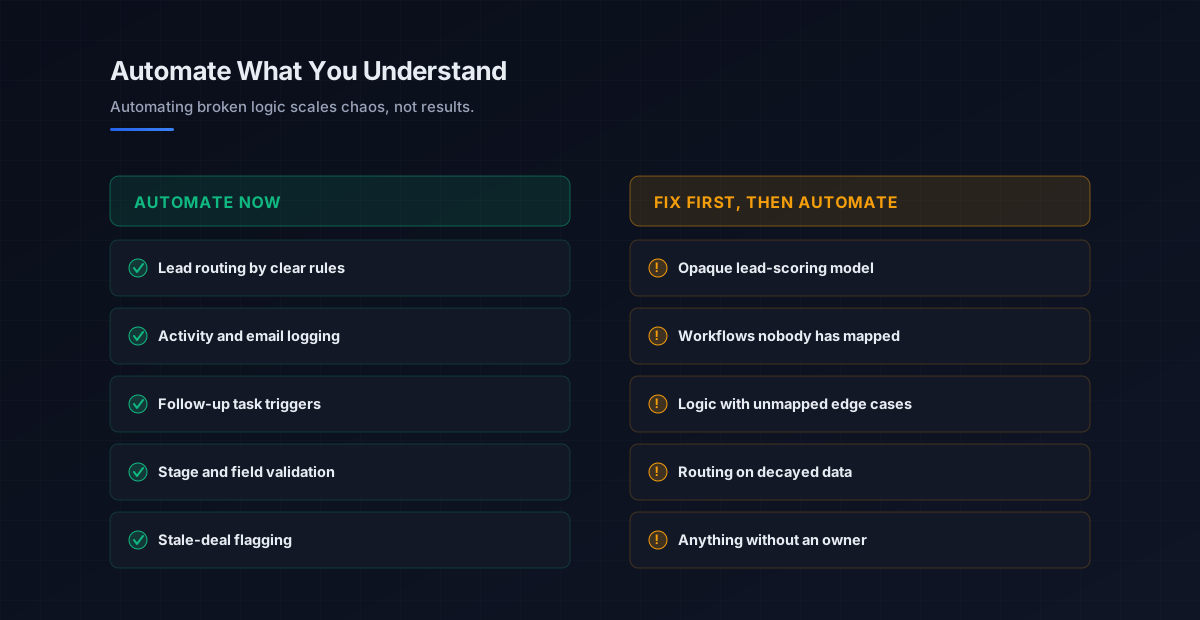
The rule that keeps automation from scaling chaos
The single most important practice in CRM automation is also the one most teams skip: never automate a process you do not understand manually. Automation is a multiplier, and a multiplier on a sound workflow saves hours while a multiplier on a broken one multiplies the breakage. If your lead-scoring model is opaque, auto-assigning leads based on it just distributes the wrong leads faster; if a workflow has edge cases nobody has mapped, automating it scales every one of those edge cases into a recurring failure.
So the discipline is to keep automation simple, owned, and reversible. Automate one task at a time rather than bundling lead scoring, routing, and email into a single tangled workflow, since simple automations are easier to test, troubleshoot, and trust. Give every automation a defined owner who is responsible for it, a human fallback for when it misfires, and a clear reason to exist, and retire anything that fails those tests. And test before going live: simulate real scenarios to confirm the trigger, condition, and action behave as intended, because an automation that fires on the wrong condition is worse than the manual step it replaced. This is the same map-before-you-automate principle from the b2b sales workflow automation guide and the broader sales automation discipline, applied to the system of record.
Why CRM automation depends on clean data and adoption
CRM automation only pays off on a foundation of clean data and real adoption, because the system is the record of the motion, not the motion itself. An automation that routes and logs against decayed contact data just moves bad records around efficiently, and a beautifully automated CRM that reps refuse to use is still an empty database. The 8.71 dollars returned for every dollar invested in CRM shows up only when the data is accurate and the team actually works inside the system.
That is why the data flowing into the CRM matters as much as the automation running on top of it. The contacts come from the b2b data providers and data enrichment tools layers, and automating outreach or routing against a stale list undermines the whole effort regardless of how clean the rules are. The activity the CRM logs depends on the channels that generate it, the cold email software and sales cadence that drive touches, and even the best logging cannot help if the domain lacks email deliverability and sender reputation so messages never land. The CRM records the motion; the data quality and the team’s adoption are what make the automation pay, so choosing the right system in the crm software pillar and keeping its data clean come before any rule you build.
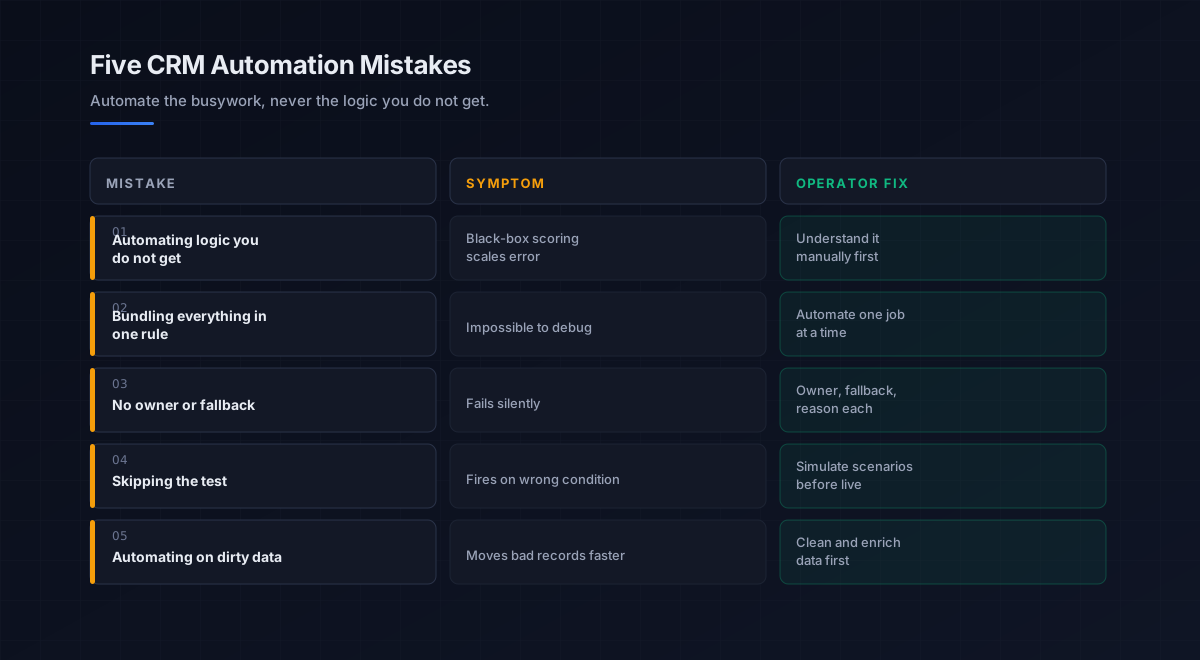
Five mistakes teams make with CRM automation
What we see most often is the same handful of errors that turn CRM automation into a liability.
-
Automating logic you do not understand. A black-box scoring model wired to routing scales the error. Understand a workflow manually before automating it.
-
Bundling everything into one workflow. Combining scoring, routing, and email into one tangled rule is impossible to debug. Automate one job at a time.
-
No owner or fallback. An automation with no one responsible and no manual backup fails silently. Give every rule an owner, a fallback, and a reason.
-
Skipping the test. A trigger that fires on the wrong condition is worse than the manual step. Simulate real scenarios before going live.
-
Automating on dirty data. Routing and logging against decayed records just moves bad data faster. Clean and enrich the data before automating around it.
An eight-step framework for CRM automation
This is the order we work through with the teams we work with when they automate inside the CRM. Run it top to bottom.
- Map the manual process. Document how a job, routing, logging, follow-up, actually works by hand before automating it.
- Pick one job. Start with the single highest-leverage task, usually lead routing or activity logging, not everything at once.
- Clean the data first. Verify and enrich the records the automation will act on, since automating on dirty data scales the mess.
- Write simple rules. Build one clear trigger-condition-action per automation rather than a tangled multi-step workflow.
- Assign an owner. Give every automation a responsible owner, a human fallback, and a documented reason to exist.
- Test against scenarios. Simulate real cases to confirm the rule fires correctly before it touches live pipeline.
- Go live and measure. Track time saved, speed-to-lead, and data accuracy, and confirm it removes friction rather than adding it.
- Iterate to the next job. Once one automation is proven and adopted, move to the next, building the system one reliable rule at a time.
How CRM automation fits the broader stack
CRM automation is the layer that keeps the system of record clean and active. Each connected layer has a deeper guide.
- The system of record. Choosing the CRM, in the crm software pillar.
- The discipline. What to automate and what to keep human, in the sales automation pillar.
- The tools. The platforms that run automation, in best sales automation tools.
- The workflow. The cross-funnel version of this, in b2b sales workflow automation.
- The data layer. What the automation acts on, in b2b data providers and data enrichment tools.
- The channels. What generates the logged activity, in cold email software and sales cadence.
- The engagement layer. What runs on top of the CRM, in sales engagement platforms.
- Strategy. The motion the CRM records, in outbound sales.
That is the map. The data layer feeds the CRM, the channels generate the activity, automation keeps the record clean and routed, and adoption keeps it alive, with the automation only as valuable as the data and the process beneath it.
Frequently asked questions
What is CRM automation?
What should I automate in my CRM first?
How much time does CRM automation save?
Can CRM automation hurt my results?
What is the difference between CRM automation and workflow automation?
Does CRM automation replace sales reps?
Does the automation matter more than the data in my CRM?
The bottom line
CRM automation in 2026 is how you turn the CRM from an admin tax into a revenue engine, by automating the four jobs that quietly drain time and data quality: lead assignment and routing, data entry and activity logging, follow-up and task triggers, and pipeline hygiene. Start with routing and logging, the two biggest wins, since instant assignment captures speed-to-lead and automatic logging keeps the data clean without anyone policing it. Done well, that returns around 12 hours per rep a week and makes the forecast trustworthy; done by bolting rules onto logic nobody understands, it just scales the mess.
If you take one rule from this guide, make it this: never automate a process you do not understand manually, because automation amplifies whatever it runs, and a multiplier on broken logic scales chaos, not results. Keep automations simple and one job at a time, give each a defined owner, a human fallback, and a clear reason to exist, test against real scenarios before going live, and build on clean data and genuine adoption. Automate the busywork you understand, never the logic you do not, and the CRM finally starts working for your reps instead of against them.
Get the operator playbook in your inbox. The Outbound Game publishes one operator-grade breakdown a week on B2B outbound sales, tactics, tooling, and ops. No fluff, no vendor talking points. Subscribe and get the next one when it ships.
More on CRM
The Best CRM for Small Business in 2026, Compared Fully
The best CRM for small business in 2026, compared by fit. HubSpot, Zoho, Pipedrive, and Freshsales on free tiers, real pricing, and what teams adopt.
CRM Software in 2026: A Full Operator Buying Guide
CRM software in 2026, explained for B2B teams: the types, how to choose, why adoption beats features, and the data foundation that makes any CRM work.
Salesforce vs HubSpot in 2026: A Full Operator Verdict
Salesforce vs HubSpot in 2026, compared by job. The customization ecosystem vs the all-in-one platform: real pricing, the 3x cost gap, and which fits.