The Best CRM for Small Business in 2026, Compared Fully
The best CRM for small business in 2026, compared by fit. HubSpot, Zoho, Pipedrive, and Freshsales on free tiers, real pricing, and what teams adopt.
The best CRM for small business in 2026 is not the one with the most features; it is the one your team will actually use out of the box, without a six-month implementation or a dedicated admin. That single constraint, no ops team to configure it, no budget for onboarding consultants, reps who need to be productive in an hour, changes the whole decision. A small business needs a CRM that works the day it is switched on, because the most powerful platform in the world produces nothing if a five-person team finds it too heavy to keep current and quietly reverts to spreadsheets. Adoption is the whole game, and at small-business scale it is decided by simplicity and fit, not capability.
That reframing matters because the field is genuinely crowded, and the tools that win for an enterprise are often the wrong pick for a team of three to fifty. The leading options sort cleanly by the small-business scenario: a free starting point, the best paid value, the simplest possible interface, a sales-focused pipeline, and built-in phone and email. Choose by where your team sits and what it will actually adopt, and the decision gets simple. This guide compares the leading platforms the way a small business owner actually decides: by fit, free tier, and real per-user cost, with adoption as the deciding factor.
This is a tool comparison inside the crm software cluster, which covers the discipline of choosing and adopting a CRM. It sits alongside the broader best crm for sales comparison and the pipedrive vs hubspot head-to-head. Whichever you pick becomes the system of record your cold email and sales cadence write back to.
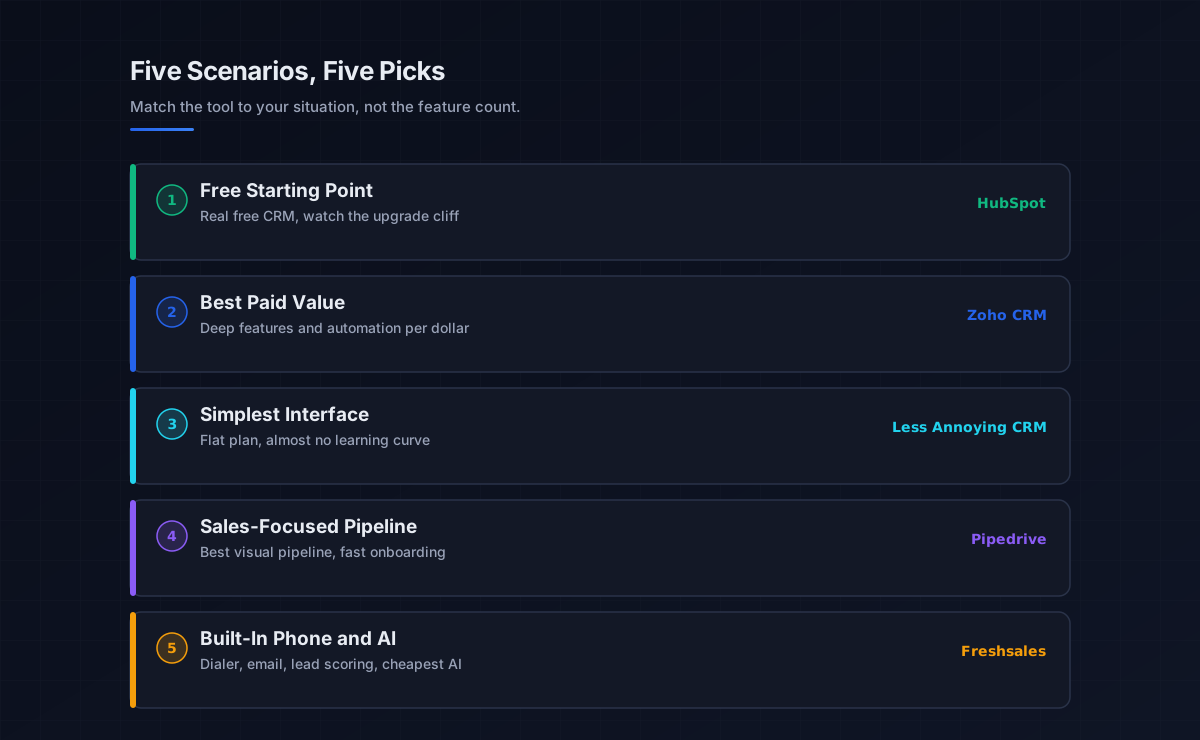
How the best CRM for small business sorts by scenario
Before comparing specs, group the field by the small-business scenario, because matching the tool to your situation matters more than any feature. The leading small business CRM tools fall into five scenarios.
The free starting point
HubSpot owns this scenario with the most generous genuinely free CRM tier: unlimited contacts, deal pipelines, basic reporting, and email tracking, supporting a small team at no cost. It is a real product, not a crippled trial, which makes it the natural starting point for a freelancer or a one-to-two-person team. The catch is the upgrade cliff: the free tier is excellent until you hit its limits, and the paid Sales Hub tiers jump steeply, with Professional adding a 1,500 dollar onboarding fee. Start free, but model the cost of where you will be in a year.
The best paid value
Zoho CRM is the value pick: a broad feature set, workflow automation even on lower tiers, 800-plus integrations through its ecosystem, and an AI assistant, from around 14 dollars a user, with a free plan for up to 3 users. The trade-off is complexity, the interface feels dated and the depth of settings can overwhelm a three-person team that just wants to track deals. It is the fit when you want maximum capability per dollar and can absorb a slightly steeper learning curve.
The simplest interface
Less Annoying CRM lives up to the name: a single flat plan around 15 dollars a user, almost no learning curve, built for small teams and solo operators who want to track contacts and deals without modules, tiers, or bloat. This is the fit when simplicity and zero setup matter more than advanced features, and it is often the right call for a non-technical small business owner.
Sales-focused and built-in phone
Pipedrive is the sales-team pick, the best visual sales pipeline in the category, fast onboarding (most teams are running in under an hour), from around 14 dollars a user, though with no free tier and no built-in marketing. Freshsales is the built-in-communication pick, a phone dialer, email, and AI lead scoring from around 9 dollars a user, the cheapest paid CRM with AI features, ideal for an outbound-calling small team.
The leading tools by fit and price
With the scenarios clear, here is how the leading platforms compare, with current 2026 pricing. Weight the free tier and real per-user cost against what your team will actually adopt.
For a free start, HubSpot offers the strongest free tier (unlimited contacts, up to a couple of free seats), with paid Sales Hub tiers climbing steeply afterward. For best value, Zoho runs about 14 dollars a user (Standard) with a free plan for 3, and the deepest feature set per dollar. For simplicity, Less Annoying CRM is a flat 15 dollars a user with the gentlest learning curve. For pure sales, Pipedrive starts around 14 dollars a user (Lite) and tops out near 79 (Ultimate), with the best pipeline UX. For built-in phone and AI, Freshsales starts around 9 dollars a user with a free tier for 3. Microsoft and Salesforce sit above this tier; Salesforce Starter at 25 dollars a user is the entry point for a team planning to scale past 50, documented at salesforce.com. The free-tier landscape is worth checking directly, since HubSpot, Zoho, and Freshsales all change limits periodically, see hubspot.com for current terms.
A note on CRM pricing that catches most small teams: free tiers stop being realistic past 3 users, and the jump to paid is where the real cost lives. Watch for onboarding fees (HubSpot Professional adds 1,500 dollars), add-on costs for advanced features, and per-user pricing that multiplies as you grow. Model the cost of where you will be in a year, not just today.
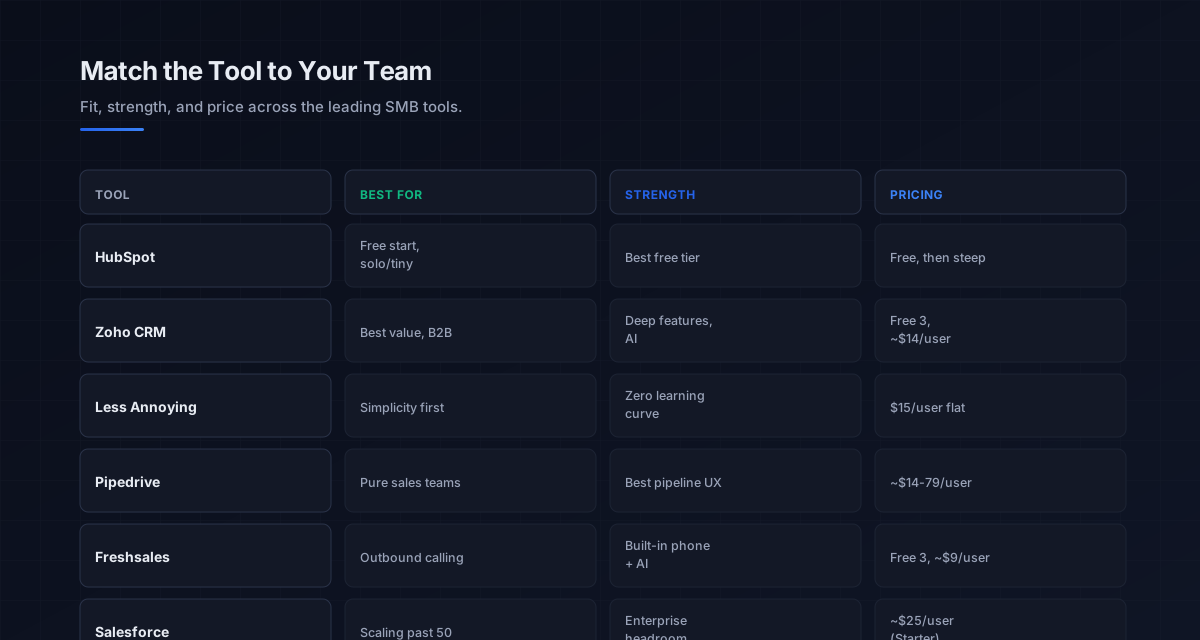
Choosing the right CRM for your small business
The selection is a sequence, not a feature shootout. Start by naming your scenario: a solo operator or tiny team points to a free tier or the simplest interface, a value-conscious team points to Zoho, a pure sales team points to Pipedrive, and an outbound-calling team points to Freshsales. That single decision narrows the field more than any feature comparison.
Then weight three things in order. First, ease of use and onboarding time, since at small scale a tool reps cannot learn in an hour will not be adopted, and adoption is the whole game. Second, the free tier or cheapest paid plan, because starting free or low lets you validate that the team will actually use it before committing budget. Third, the real total cost as you grow, model per-user pricing, onboarding fees, and the upgrade cliff a year out, not just the entry price. Right-size to your actual scale: a free CRM is the right answer for a freelancer with a sales pipeline that fits on one screen, and a 25-dollar Salesforce Starter only makes sense when you are planning to scale past 50. The discipline behind choosing and adopting any CRM, and the three CRM types, lives in the crm software pillar.
Why adoption decides the small business CRM
The reason adoption matters more than features at small-business scale is structural: a small team has no dedicated admin to configure the tool, enforce usage, or clean the data, so the CRM has to earn its keep on simplicity alone. When it does not, reps revert to spreadsheets, the records go stale, and the CRM becomes a source of false confidence rather than truth. The system of record is only valuable if it is current, and at small scale current means easy.
That is why the small business CRM sits at the center of a lean stack and depends on the layers around it. The contacts come from the b2b data providers and data enrichment tools layers, and a CRM full of decayed data loses trust fast, since roughly 30 percent of B2B data goes stale each year. The outreach that updates it runs through cold email software and the sales cadence, and only lands if the domain has clean email deliverability. For a small team running outbound and B2B prospecting, keeping the CRM current and the data clean is what turns it from an expense into the single trusted view of the pipeline, which is the whole point of adopting one.
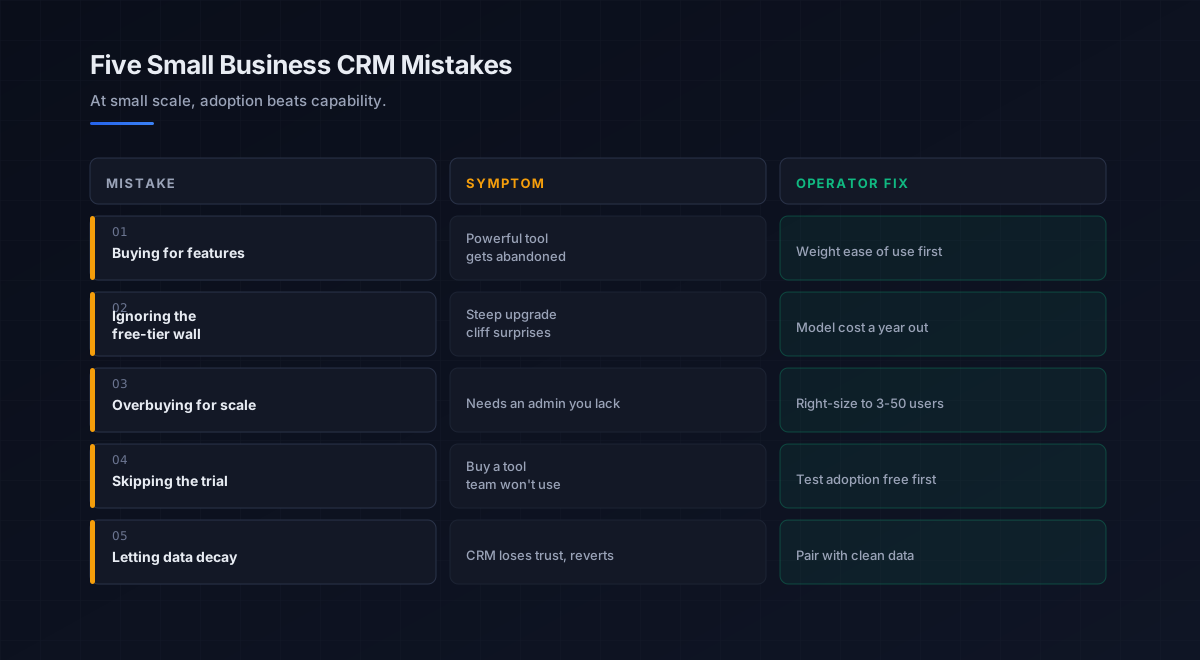
Five mistakes small businesses make choosing a CRM
What we see most often is the same handful of errors that lead to an abandoned subscription.
-
Buying for features, not adoption. The most powerful platform a small team avoids is worse than a simple one they use. Weight ease of use above the feature matrix.
-
Ignoring the free-tier wall. HubSpot’s free tier is excellent until the steep upgrade cliff. Model the cost of where you will be in a year before committing.
-
Overbuying for your scale. An enterprise platform needs an admin a small team does not have. Right-size to three-to-fifty, not to a future you are not at yet.
-
Skipping the trial. Free tiers and trials let you test adoption before paying. Skipping them risks buying a tool the team will not use.
-
Letting data decay. A CRM on stale data loses trust and reverts to spreadsheets. Pair it with enrichment and a deliverable domain so it stays current.
An eight-step framework for choosing a small business CRM
This is the order we work through with the teams we work with when a small business picks a CRM. Run it before buying anything.
- Name your scenario. Solo, value-conscious, simplicity-first, sales-focused, or calling-heavy, since that points to the tool.
- Shortlist within the scenario. Pick two or three tools built for that situation rather than comparing the whole field.
- Weight ease of use. Confirm reps can be productive in about an hour, since adoption is the whole game at small scale.
- Start free or cheap. Use a free tier or the cheapest paid plan to validate adoption before committing budget.
- Model the real cost. Include onboarding fees, add-ons, and the upgrade cliff a year out, not just the entry price.
- Check integration with your stack. Confirm clean sync with your email, calendar, and outreach so data updates without manual work.
- Plan data hygiene. Pair the CRM with enrichment and a deliverable domain so records stay current and trusted.
- Pilot, then commit. Run the finalist with the real team for a few weeks, confirm they keep it current, then standardize.
How the small business CRM fits the broader stack
A small business CRM is the system of record at the center of a lean outbound stack. Each connected layer has a deeper guide.
- The discipline. Choosing and adopting any CRM, in the crm software pillar.
- The wider comparison. Platforms by camp for sales teams, in best crm for sales.
- The head-to-head. The closest two-way decision, in pipedrive vs hubspot.
- The data layer. The contacts the CRM stores, in b2b data providers and data enrichment tools.
- The email channel. Outreach logged to the record, in cold email software and the cold email pillar.
- The cadence. How touches are sequenced, in sales cadence and sales engagement platforms.
- Intent. Signals that prioritize records, in sales intelligence tools.
- Strategy. The motion the CRM supports, in outbound sales.
That is the map. The data layer supplies and maintains the contacts, the channels run the outreach and log it, and the small business CRM holds the single trusted view of the pipeline, only as valuable as how reliably a lean team keeps it current.
Frequently asked questions
What is the best CRM for small business in 2026?
What is the best free CRM for a small business?
How much does a CRM cost for a small business?
Do I need a CRM if I am a one-person business?
Which small business CRM is easiest to use?
Is HubSpot or Zoho better for a small business?
Should a small business choose Salesforce?
The bottom line
The best CRM for small business in 2026 is the one your team will actually use, not the one with the longest feature list. The best CRM for small business sorts by scenario: HubSpot for the best free start, Zoho for the best paid value, Less Annoying CRM for the simplest interface, Pipedrive for a sales-focused pipeline, and Freshsales for built-in phone and AI on the cheapest paid plan. To find the best CRM for small business, name your scenario, weight ease of use and the free tier above the feature matrix, and model the real cost a year out, including the upgrade cliff.
If you take one rule from this comparison, make it this: at small-business scale, adoption beats capability every time. A small team has no admin to enforce usage, so the CRM has to win on simplicity, and the most powerful platform produces nothing if reps revert to spreadsheets. Start free or cheap, pick the tool your team will keep current without training, pair it with clean data and a deliverable domain, and upgrade only when a real limit forces it, because the system of record is only worth anything when it is actually current.
Get the operator playbook in your inbox. The Outbound Game publishes one operator-grade breakdown a week on B2B outbound sales, tactics, tooling, and ops. No fluff, no vendor talking points. Subscribe and get the next one when it ships.
More on CRM
CRM Automation in 2026: A Full Operator Field Guide
CRM automation in 2026: the four jobs worth automating inside your CRM, the rule that keeps it from scaling chaos, and how to turn admin into revenue.
CRM Software in 2026: A Full Operator Buying Guide
CRM software in 2026, explained for B2B teams: the types, how to choose, why adoption beats features, and the data foundation that makes any CRM work.
Salesforce vs HubSpot in 2026: A Full Operator Verdict
Salesforce vs HubSpot in 2026, compared by job. The customization ecosystem vs the all-in-one platform: real pricing, the 3x cost gap, and which fits.