The Best CRM for Sales in 2026, Compared Fully by Fit
The best CRM for sales in 2026, compared by team and motion. An operator guide to Pipedrive, HubSpot, Salesforce, adoption, and real pricing.
The best CRM for sales in 2026 is not the most powerful one; it is the one your reps actually use. That sounds obvious until you watch a team spend six figures on Salesforce, configure it for eighteen months, and still find reps tracking their real pipeline in a spreadsheet because the system is too heavy to update between calls. An unused CRM is worse than no CRM, because it gives leadership false confidence in data nobody is maintaining. So the right question is never which platform has the most features. It is which platform fits your team’s size, sales motion, and existing stack closely enough that reps keep it current without being forced to.
With more than 800 pieces of CRM software on the market, the choice feels daunting, but it collapses once you see that the field sorts into three camps. Sales-native platforms are built around a visual pipeline and rep adoption (Pipedrive, Pipeline CRM, Close). Unified suites bundle sales with marketing and service on one record (HubSpot, Salesforce, Zoho). And work-OS tools layer CRM onto a broader workspace (Monday, Copper). Pricing spans an enormous range, from around 9 dollars per user a month for entry tools to 175 dollars and up for enterprise, and the right pick falls out of your camp, not a feature scoreboard.
This opens the CRM layer, the system of record that everything else in outbound syncs to. It is the source of truth that the sales engagement platforms write activity back into, the home for the contacts your B2B prospecting and b2b data providers supply, and the backbone the whole sales cadence runs against. Get it right and every other tool has a clean place to land.
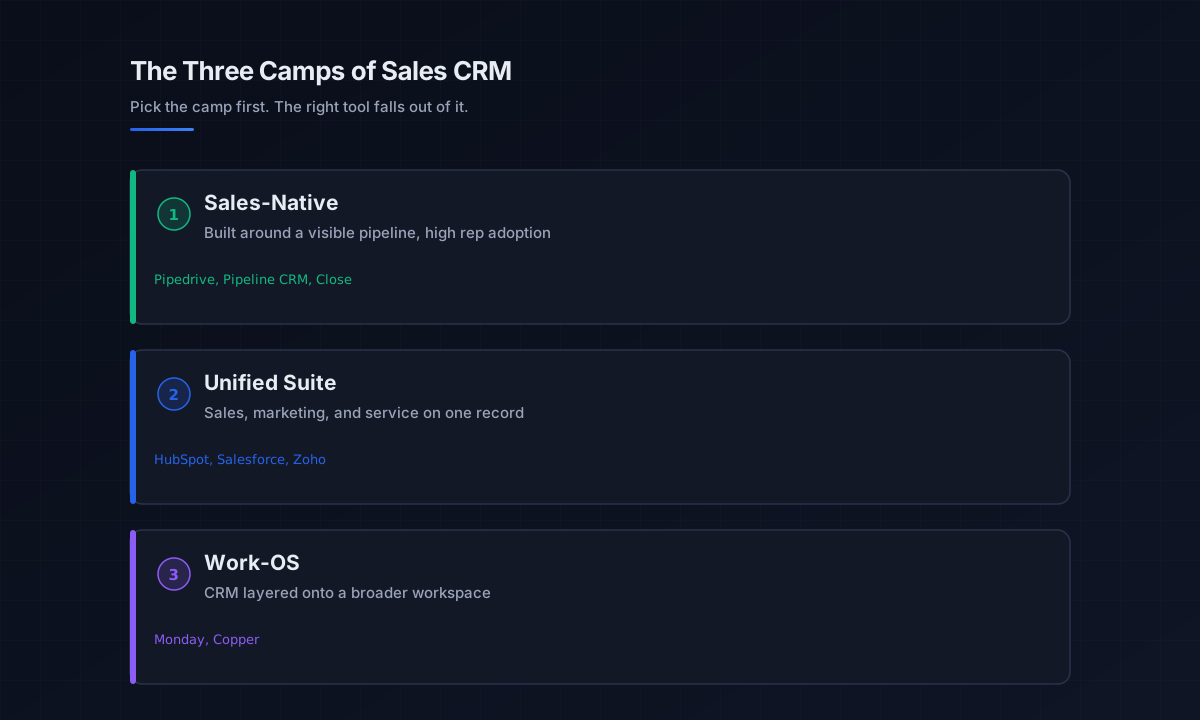
The three camps of the best CRM for sales
Before comparing individual tools, understand the camps, because choosing the wrong category is the most expensive CRM mistake. Each suits a different team and motion, and identifying yours is the first step to the best CRM for sales for your situation.
Sales-native platforms
Built around one idea: your sales process should be visible. Every deal, contact, and activity organizes around a central pipeline view that shows exactly what to do next. Pipedrive leads this camp, with Pipeline CRM and Close alongside, and they win on rep adoption because the visual, activity-based model reduces friction, reps update them because it is fast, not because they are told to. This is the best sales crm category for high-touch B2B teams that do not need a marketing hub bolted on, and the usual answer for the best CRM for small business sales teams.
Unified suites
These bundle sales, marketing, and customer service on a single customer record. HubSpot is the strongest for teams that want sales and marketing unified with fast onboarding and a genuine free tier; Salesforce is the most powerful and customizable, built for enterprise complexity; Zoho is the budget option that genuinely delivers. The trade-off is that you are buying breadth, which is powerful when you use it and overhead when you do not.
Work-OS platforms
Tools like Monday layer CRM onto a broader work management workspace, and Copper builds CRM natively into Google Workspace. These fit teams that want their CRM to live inside the tool they already run their work in, rather than as a separate system. They are less specialized for sales but lower friction for the right team.
The leading sales CRMs by fit
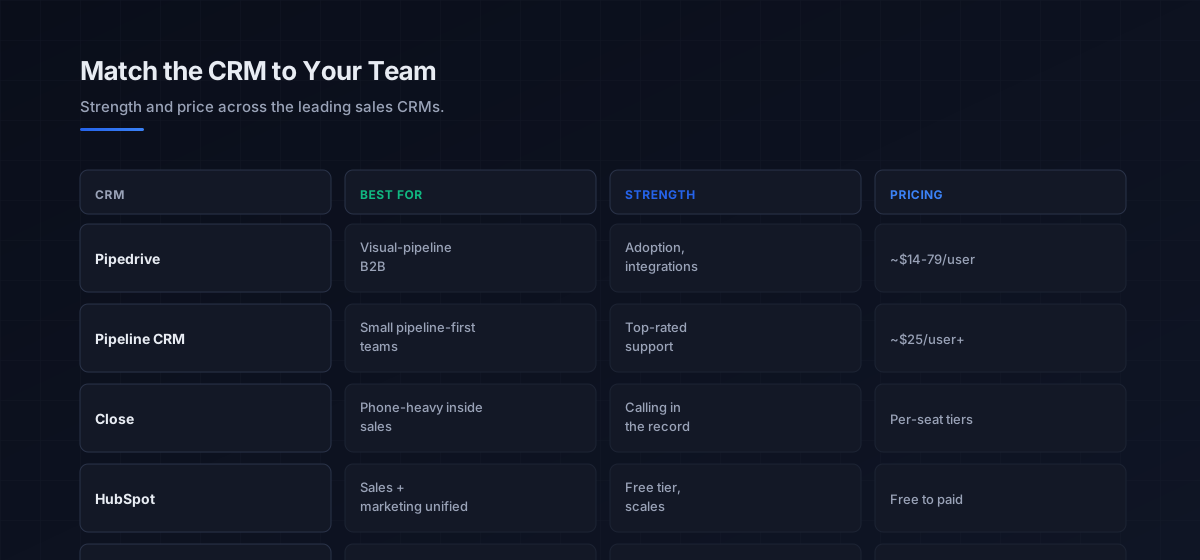
With the camps clear, here are the platforms teams actually reach for, matched to who they fit. Pricing is current for 2026.
For visual-pipeline B2B teams, Pipedrive is the category leader, built around pipeline visibility and high rep adoption, with broad integrations (500-plus apps) and predictable pricing from around 14 dollars to 79 dollars a user. Pipeline CRM is the strongest pick for small and mid-sized sales teams wanting pipeline-first simplicity, with top-rated support (among the highest G2 ratings in the category), from around 25 dollars a user. Close is purpose-built for phone-heavy inside sales, with calling baked into the record. These sales-native tools share a virtue that defines the best CRM for sales in this camp: reps keep them current.
For teams that need sales and marketing unified, HubSpot is the default, a free CRM tier with solid contact and pipeline management and a path to scale, though advanced automation and AI sit behind paid upgrades that climb quickly. For enterprise complexity, Salesforce dominates, the deepest automation, the largest app ecosystem (7,000-plus integrations on AppExchange), and the most mature AI on the Salesforce platform, but it needs a dedicated sales-ops team and budget, and it is genuinely overkill and overpriced for a small team. For a budget unified suite, Zoho delivers real capability cheaply, and for Gmail-native or work-OS teams, Copper and Monday fit the workflow.
Sales-native vs unified suite: the core decision
The decision underneath everything is whether you need a sales-native tool or a unified suite, and it turns on one question: does marketing genuinely share the customer record. A sales-native CRM (sometimes the distinction is drawn as a pure sales tool versus a broader customer platform) optimizes for the sales motion, visible pipeline, activity-based selling, fast updates, and nothing else competing for the interface. For a focused sales team, that single-purpose design is a feature, not a limitation, and often the best CRM for sales is the most narrowly focused one.
A unified suite earns its breadth only when sales, marketing, and service actually operate off the same record, when marketing’s lead scoring feeds sales, and service history informs renewals. If that integration is real, the suite is powerful; if marketing runs its own tools anyway, you are paying for and navigating around capability you do not use. The honest test: would a pure sales-focused CRM leave a real gap, or just a shorter feature list. For many B2B sales teams, the answer is the latter, and the simpler sales crm wins on adoption and cost. This connects to how the sales engagement platforms layer sits on top of whichever record you choose.
How the CRM fits the outbound stack
The CRM is the system of record, and its value is realized only when the rest of the stack writes to it cleanly. It is not a data provider, the contacts come from the b2b data providers and data enrichment tools layers, and it is not an execution engine, the sequences run in the sales engagement platforms layer and sync activity back. The CRM is where all of it lands and becomes the single source of truth for pipeline and forecasting.
That makes integration depth a first-order buying criterion, not an afterthought. A CRM that syncs cleanly with your engagement platform, your enrichment, and your calendar keeps the sales pipeline accurate without manual entry, which is what protects rep adoption. This is why the CRM choice and the engagement choice are linked: Salesforce-centric teams favor engagement tools with the deepest Salesforce sync, covered in Outreach vs Salesloft, while HubSpot shops favor HubSpot-native execution. The CRM anchors the stack that runs the outbound sales motion, and the cold email and cold calling channels all log back to it.
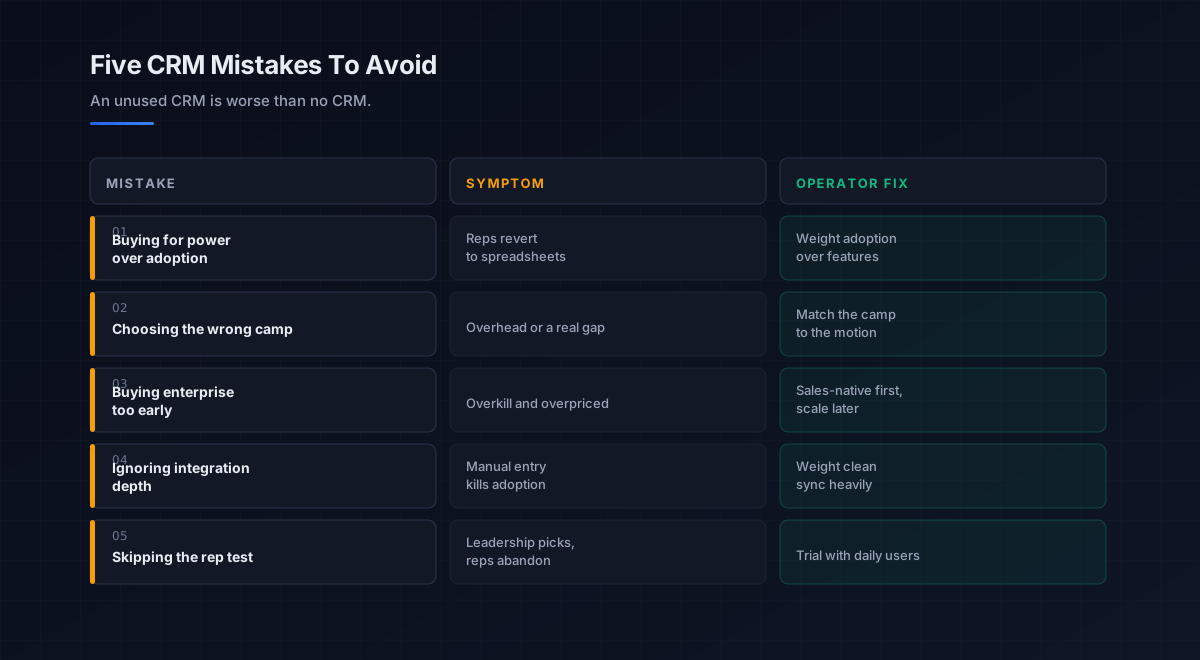
Five mistakes teams make choosing a sales CRM
What we see most often is the same handful of errors that lead to an abandoned CRM.
-
Buying for power over adoption. The most powerful CRM reps avoid is worse than a simpler one they use. Weight rep adoption above the feature matrix.
-
Choosing the wrong camp. A unified suite for a pure sales team is overhead; a sales-native tool where marketing must share the record leaves a gap. Match the camp to the motion.
-
Buying enterprise too early. Salesforce on a ten-person team is overkill and overpriced. Use a sales-native tool or a lighter suite and revisit at scale.
-
Ignoring integration depth. A CRM that does not sync cleanly with your engagement and data tools forces manual entry, which kills adoption. Weight integrations heavily.
-
Skipping the rep test. Leadership picks the CRM; reps abandon it. Involve the people who live in it daily and choose what they will actually update.
An eight-step framework for choosing a sales CRM
This is the order we work through with the teams we work with when they pick a CRM. Run it before buying anything.
- Define your sales motion. High-touch B2B, high-velocity inside sales, or marketing-led, the motion points to a camp.
- Pick the camp first. Sales-native for a focused sales team, unified suite if marketing shares the record, work-OS if you live in one workspace.
- Right-size to team scale. Sales-native or a light suite under roughly 50 reps; enterprise only with ops resources to run it.
- Map your existing stack. Choose the CRM that syncs cleanly with your engagement platform, enrichment, and calendar.
- Weight integration depth. Treat clean bidirectional sync as a core requirement, since manual entry kills adoption.
- Model real pricing. Account for per-seat cost plus the paid upgrades that unlock automation, especially on free-tier suites.
- Run a rep trial. Test finalists with the people who will update them daily, and let adoption decide.
- Judge on pipeline accuracy. Measure whether the CRM reflects reality without nagging, since an accurate, used record is the whole point.
How the CRM fits the broader stack
The CRM is the system of record at the center of the outbound stack. Each connected layer has a deeper guide.
- The engagement layer. What writes activity back to the CRM, in sales engagement platforms and sales cadence.
- The data layer. The contacts the CRM stores, in b2b data providers and data enrichment tools.
- The email channel. Outreach logged to the record, in cold email software and the cold email pillar.
- The phone channel. Calls logged to the record, in the cold calling pillar.
- LinkedIn. Social touches tracked against the record, in LinkedIn outreach.
- Intent. Signals that prioritize records, in sales intelligence tools.
- The AI layer. AI that enriches and updates the CRM, in best AI sales tools.
- Strategy. The motion the CRM supports, in outbound sales.
That is the map. The data layer supplies the contacts, the engagement layer runs the outreach and logs it, the CRM holds the single source of truth for pipeline and forecasting, and every other tool is only as useful as how cleanly it writes to that record.
Frequently asked questions
What is the best CRM for sales in 2026?
What is the best CRM for a small business?
How much does a sales CRM cost?
What is the difference between a sales CRM and a unified CRM suite?
Should a small team use Salesforce?
Why do sales teams abandon their CRM?
Does the CRM choice affect my sales engagement platform?
The bottom line
The best CRM for sales in 2026 is the one matched to your team, motion, and stack closely enough that reps keep it current, not the one with the most features. The field sorts into three camps, sales-native tools like Pipedrive and Close built for pipeline visibility and adoption, unified suites like HubSpot and Salesforce that bundle marketing and service, and work-OS platforms like Monday, and the right pick falls out of which camp fits, then which tool inside it suits your scale and budget. Weight rep adoption and integration depth above the feature scoreboard.
If you take one rule from this guide, make it this: an unused CRM is worse than no CRM. A platform that is 80 percent as capable and fully used beats one that is fully featured and half-abandoned, because the entire value is an accurate, current record of your sales pipeline. Pick the camp that fits your motion, right-size to your scale, weight clean integrations, test it with the reps who will live in it, and choose the one your team will actually update.
Get the operator playbook in your inbox. The Outbound Game publishes one operator-grade breakdown a week on B2B outbound sales, tactics, tooling, and ops. No fluff, no vendor talking points. Subscribe and get the next one when it ships.
More on CRM
The Best CRM for Small Business in 2026, Compared Fully
The best CRM for small business in 2026, compared by fit. HubSpot, Zoho, Pipedrive, and Freshsales on free tiers, real pricing, and what teams adopt.
CRM Automation in 2026: A Full Operator Field Guide
CRM automation in 2026: the four jobs worth automating inside your CRM, the rule that keeps it from scaling chaos, and how to turn admin into revenue.
CRM Software in 2026: A Full Operator Buying Guide
CRM software in 2026, explained for B2B teams: the types, how to choose, why adoption beats features, and the data foundation that makes any CRM work.