Pipedrive vs HubSpot in 2026: An Operator Comparison
Pipedrive vs HubSpot in 2026, compared by fit. The pipeline-first tool vs the unified suite: real pricing, the free-tier trap, and which fits your team.
The honest answer to Pipedrive vs HubSpot in 2026 is that they are not really competing for the same job, and once you see that, the decision gets simple. Pipedrive is a sales-native CRM built around one idea: make the pipeline visible and let reps close deals with minimal friction. HubSpot is a unified suite that bundles sales, marketing, and customer service onto one customer record. They are the two most-considered SMB CRMs on the market (both top-rated on G2), but the choice is not which one is better in the abstract, it is which one fits the team you actually have today, your motion, your budget, and whether marketing genuinely shares the record.
Get that framing right and most of the noise falls away. If your primary need is sales pipeline management, Pipedrive almost always wins on simplicity, adoption, and predictable cost. If your primary need is connecting marketing to sales to service on one platform, HubSpot’s breadth earns its keep. The trap that catches most teams is HubSpot’s genuinely useful free tier, which lures you in and then escalates sharply once you need real sales features, while Pipedrive’s per-user pricing scales linearly with no surprises. This CRM comparison weighs them the way an operator actually decides.
This is a head-to-head inside the best CRM for sales comparison, where Pipedrive anchors the sales-native camp and HubSpot the unified-suite camp. Whichever you choose becomes the system of record that your sales engagement platforms sync activity into and that the whole sales cadence runs against, so the choice ripples through the entire stack.
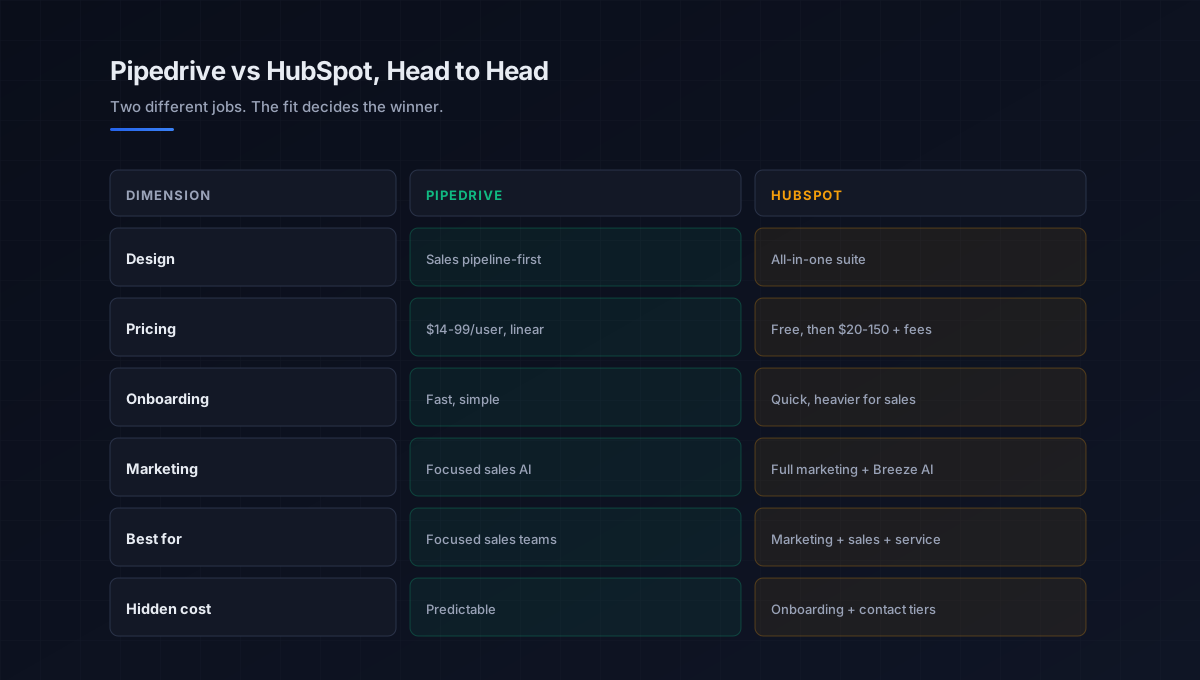
Where the two genuinely differ
They overlap on core CRM basics, contacts, deals, pipeline, reporting, so focus on the dimensions where the experience and the economics actually diverge. This is what should drive the decision.
Design philosophy
Pipedrive is built for people who sell. Everything organizes around a visual pipeline that shows exactly what to do next, and the activity-based model keeps reps updating it because it is fast, not because they are told to. HubSpot is built as an all-in-one ecosystem championing inbound methodology, where the CRM is one module alongside marketing automation, content, and service. Pipedrive does one thing cleanly; HubSpot does many things from one place.
Pricing and the total cost
This is the sharpest difference. Pipedrive pricing is predictable and linear: Essential around 14 dollars, Advanced 29, Professional 59, Power 69, and Enterprise 99 per user per month, so a ten-person team on a mid tier costs a known, modest number. HubSpot starts with a genuinely useful free CRM, then Sales Hub Starter around 20 dollars, Professional around 90, and Enterprise around 150 per seat, but the real cost hides in mandatory onboarding fees (roughly 3,000 dollars at Professional, 7,000 at Enterprise), annual commitments, and contact-tier pricing that climbs as your database grows. The HubSpot pricing model rewards breadth of use and punishes the team that only wanted a sales CRM.
Onboarding and adoption
Pipedrive’s onboarding is faster and its interface simpler, which is why small sales teams reach productive use quickly and adoption stays high. HubSpot is also known for an intuitive interface and quick onboarding relative to enterprise tools, and it drives strong adoption when the whole go-to-market team is on it, but a pure sales team often finds it heavier than it needs. For teams under about ten people focused purely on closing, Pipedrive is usually the better starting point.
Marketing and AI breadth
Here HubSpot pulls ahead by design. Its marketing automation, attribution, content tools, and the Breeze AI assistant span the full customer lifecycle, which is the entire reason to choose it. Pipedrive offers solid sales insights, forecasting, and focused AI where salespeople need it, plus 500-plus integrations to extend it, but it is not trying to run your marketing. If you need campaign analytics and lead nurturing in the same tool, that is a HubSpot decision, not a Pipedrive one.
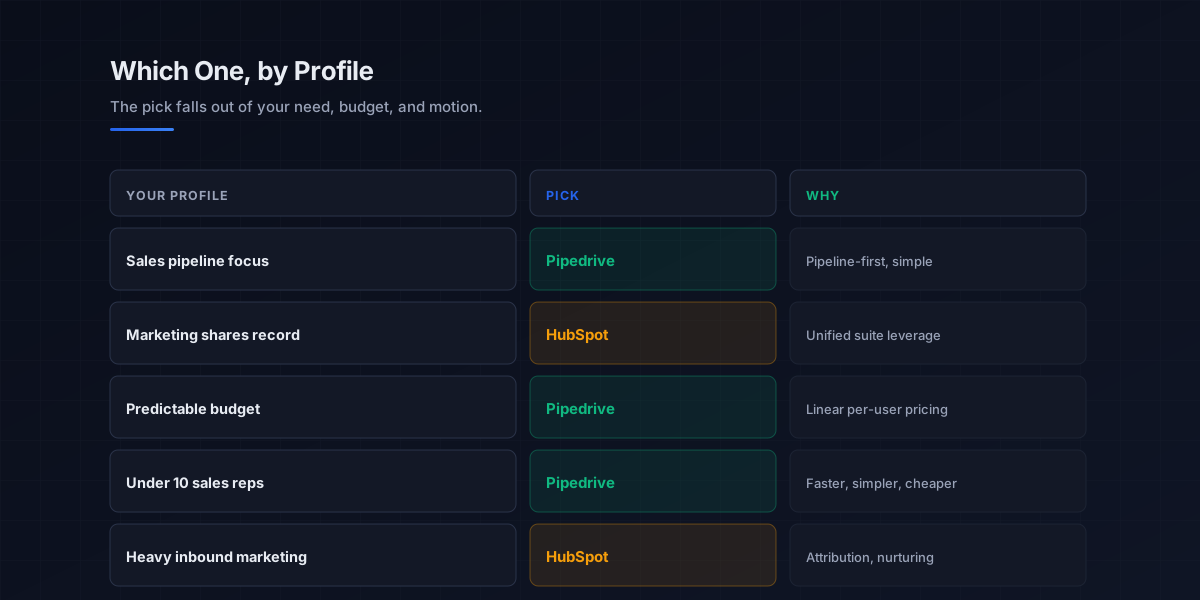
The decision in three questions
Because they fit different teams, the cleanest way through the hubspot vs pipedrive choice is three questions, in order.
First, what is your primary need. If it is sales pipeline management, closing deals, tracking stages, rep productivity, Pipedrive wins. If it is connecting marketing to sales to service on one record, HubSpot is the better fit. This single question resolves most decisions on its own.
Second, what is your budget and growth timeline. Pipedrive offers predictable per-user pricing that scales linearly, which suits a team that wants a known cost. HubSpot demands a bigger commitment but bundles more, so it pays off only if you use the breadth. Model the three-year cost including onboarding fees and contact tiers, not the first month.
Third, does marketing genuinely share the record. This is the tiebreaker. If marketing runs its own tools and sales just needs a pipeline, the suite is overhead. If lead scoring, nurturing, and attribution flow into the same system sales lives in, the suite is leverage. Be honest about which is true today, not which you aspire to. This connects to picking the right camp in the broader best CRM for sales guide.
How the CRM choice fits the outbound stack
Whichever you choose, the CRM is the system of record, and its value depends on how cleanly the rest of the stack writes to it. Neither Pipedrive nor HubSpot is a data provider, the contacts come from your B2B prospecting via the b2b data providers and data enrichment tools layers, and the outreach itself runs in the sales engagement platforms layer and syncs back. The CRM is where pipeline and forecasting become a single source of truth.
That makes integration depth a real factor in the Pipedrive vs HubSpot call. HubSpot’s native marketing-to-sales handoff is a strength if you are all-in on its ecosystem, while Pipedrive’s 500-plus integrations let you assemble a best-of-breed stack around a focused sales core, the same best-of-breed logic enterprise buyers weigh against platforms like Salesforce. Either way the CRM anchors the outbound sales motion, and the cold email and cold calling channels log their activity back to whichever record you pick. The LinkedIn layer in LinkedIn outreach syncs the same way, so the cleaner the sync, the more accurate the pipeline.
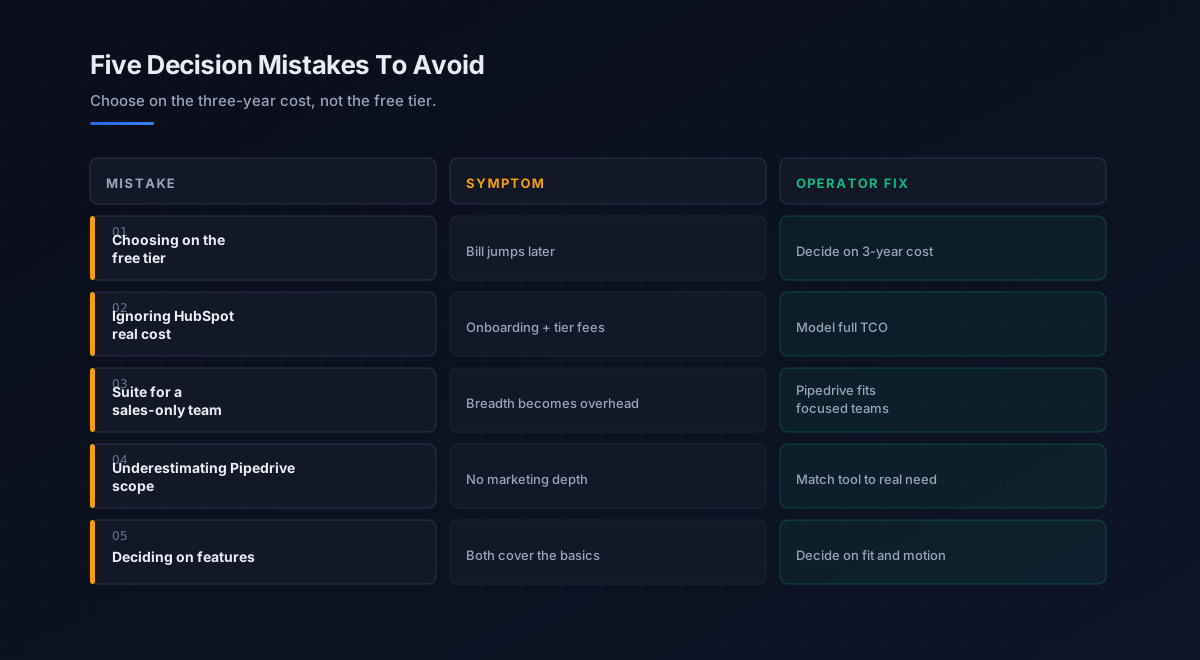
Five mistakes teams make choosing between Pipedrive and HubSpot
What we see most often is the same handful of errors in this specific decision.
-
Choosing on the free tier. HubSpot’s free CRM is a funnel into a larger spend. Decide on the three-year cost and the motion, not the signup price.
-
Ignoring HubSpot’s real cost. Onboarding fees, annual commitments, and contact-tier pricing add up fast. Model total cost of ownership, not the headline per-seat number.
-
Buying the suite for a sales-only team. If marketing does not share the record, HubSpot’s breadth is overhead. A focused sales team usually fits Pipedrive better.
-
Underestimating Pipedrive for marketing. If you genuinely need campaign analytics and nurturing in one tool, Pipedrive is the wrong pick. Match the tool to the actual need.
-
Deciding on features, not fit. Both cover CRM basics well. Decide on motion, budget, and whether marketing shares the record, not a feature checklist.
An eight-step framework for the Pipedrive vs HubSpot decision
This is the order we work through with the teams we work with on this specific choice. Run it before committing to either.
- Name your primary need. Sales pipeline management points to Pipedrive; unified marketing-sales-service points to HubSpot.
- Check whether marketing shares the record. Genuine shared use justifies the suite; separate marketing tools favor the focused option.
- Right-size to team scale. Under about ten sales-focused reps, Pipedrive usually fits; broader go-to-market teams lean HubSpot.
- Model the three-year cost. Include onboarding fees, annual commitments, and contact-tier growth, not just the entry price.
- Map your existing stack. Favor HubSpot for an all-in ecosystem, Pipedrive for a best-of-breed stack via its integrations.
- Weight rep adoption. The CRM reps keep current wins; Pipedrive’s simplicity is an adoption advantage for pure sales teams.
- Run a parallel trial. Test both with the reps who will live in them daily, on your real pipeline, before deciding.
- Judge on pipeline accuracy and TCO. Pick the one that stays current without nagging and that you will still be happy paying for at year three.
How the CRM fits the broader stack
The CRM is the system of record at the center of the outbound stack. Each connected layer has a deeper guide.
- The CRM overview. All three camps and how to choose, in best CRM for sales.
- The engagement layer. What writes activity back to the CRM, in sales engagement platforms and sales cadence.
- The data layer. The contacts the CRM stores, in b2b data providers and data enrichment tools.
- The email channel. Outreach logged to the record, in cold email software and the cold email pillar.
- The phone channel. Calls logged to the record, in the cold calling pillar.
- LinkedIn. Social touches tracked against the record, in LinkedIn outreach.
- Intent. Signals that prioritize records, in sales intelligence tools.
- Strategy. The motion the CRM supports, in outbound sales.
That is the map. The data layer supplies the contacts, the engagement layer runs the outreach and logs it, and the CRM, Pipedrive or HubSpot, holds the single source of truth, so the choice matters most for how cleanly the rest of your stack writes to it.
Frequently asked questions
Is Pipedrive or HubSpot better in 2026?
Is Pipedrive cheaper than HubSpot?
Is HubSpot's free CRM actually free?
Which is better for a small sales team, Pipedrive or HubSpot?
When should I choose HubSpot over Pipedrive?
Does the Pipedrive vs HubSpot choice affect my other sales tools?
Can I migrate from HubSpot to Pipedrive or vice versa?
The bottom line
Pipedrive vs HubSpot in 2026 is not a contest of which is better, but of which fits the team you have. Pipedrive is the sales-native, pipeline-first CRM with predictable per-user pricing and high rep adoption, ideal for focused sales teams that want a tool reps keep current without surprises. HubSpot is the unified suite that connects marketing, sales, and service on one record, worth its higher and less predictable cost only when you genuinely use that breadth. Decide on primary need, budget, and whether marketing shares the record.
If you take one rule from this comparison, make it this: choose on the three-year cost and the motion, not the free tier. HubSpot’s free CRM is an excellent product and an effective funnel into a much larger spend, while Pipedrive’s linear pricing rarely surprises you. Name your primary need, be honest about whether marketing shares the record, model the real total cost of ownership, and pick the CRM you will still be happy paying for once the team has grown and the database has tripled.
Get the operator playbook in your inbox. The Outbound Game publishes one operator-grade breakdown a week on B2B outbound sales, tactics, tooling, and ops. No fluff, no vendor talking points. Subscribe and get the next one when it ships.
More on CRM
The Best CRM for Small Business in 2026, Compared Fully
The best CRM for small business in 2026, compared by fit. HubSpot, Zoho, Pipedrive, and Freshsales on free tiers, real pricing, and what teams adopt.
CRM Automation in 2026: A Full Operator Field Guide
CRM automation in 2026: the four jobs worth automating inside your CRM, the rule that keeps it from scaling chaos, and how to turn admin into revenue.
CRM Software in 2026: A Full Operator Buying Guide
CRM software in 2026, explained for B2B teams: the types, how to choose, why adoption beats features, and the data foundation that makes any CRM work.