Sendspark vs Vidyard in 2026: A Full Operator Guide
Sendspark vs Vidyard in 2026, compared by job. AI personalization at scale vs the all-rounder: real pricing, integrations, and which one fits your team.
The honest answer to Sendspark vs Vidyard in 2026 is that both are real outbound video tools, which makes this a closer call than most video comparisons, and the decision comes down to whether you optimize for personalization at scale or for breadth. Sendspark is built around one job: record a single base video and let AI voice cloning and dynamic backgrounds generate a personalized version for every prospect, with native sync into the sequencers SDR teams live in. Vidyard is the all-rounder, the most generous free tier in the category, the deepest video hosting and library management, viewer-level analytics, and a full platform that covers recording, hosting, and outreach in one place. They overlap, but they lead with different strengths, so the right pick depends on what your team most needs.
Get that framing right and the choice gets simple. If you are an SDR or marketing team running high-volume cold video outreach for B2B prospecting and personalization at scale is the constraint, Sendspark leads, since generating a unique video per prospect is its core design rather than an add-on. If you want one tool for video assets and outbound, value the strongest free tier to start, or need enterprise-grade hosting and analytics, Vidyard is the broader fit. This guide compares them the way an operator actually decides: by job and scale, then by price, with the data foundation assumed.
This is a head-to-head inside the video prospecting cluster, where the best video prospecting tools guide covers the wider field and vidyard vs loom covers the sales-versus-async question. Whichever you pick rides on top of your cold email and sales cadence and logs activity to your CRM software.
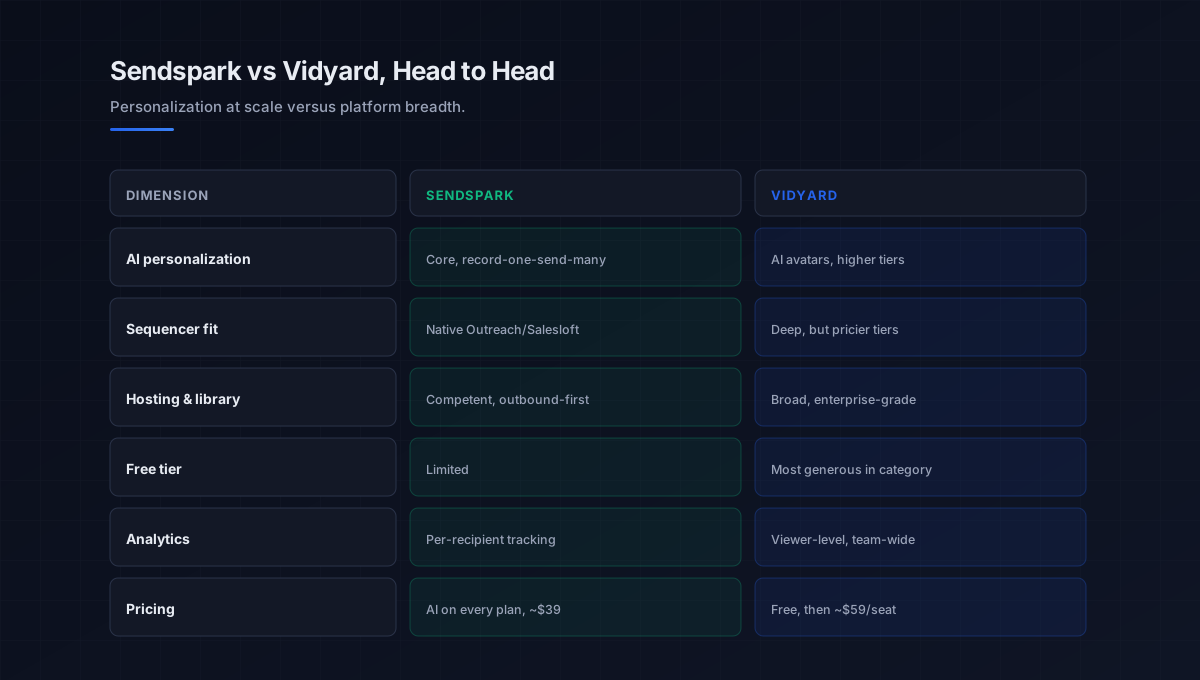
Sendspark vs Vidyard: where the two genuinely differ
Both record, host, and track video, so focus on the dimensions where they actually diverge for an outbound team. This is what should settle the choice.
AI personalization
This is the core difference. Sendspark’s whole design is personalization at scale: record one video, and AI voice cloning plus dynamic backgrounds (the prospect’s name, company, and website woven into each) generate many individualized versions quickly. Vidyard offers AI too, but its comparable personalization centers on AI avatars and tends to sit on higher-priced tiers with monthly generation caps. For high-volume cold outreach where every video must feel made-for-them, Sendspark leads on depth; for occasional personalized sends, Vidyard’s tools are sufficient.
Integrations and workflow
Both integrate widely, but the emphasis differs. Sendspark leans into the outbound sequencer stack, native connections to Outreach, Salesloft, Apollo, and newer sequencers, so reps send personalized video from inside an automated sequence, with engagement syncing back to HubSpot or Salesforce. Vidyard offers deep CRM integrations too, though its most advanced sales-engagement connections often require its higher business tiers. If your reps live in a sequencer and want video inside the cadence, weight Sendspark’s native sequencer fit.
Hosting, library, and analytics
This is where Vidyard’s breadth shows. It provides centralized video hosting, library management, advanced user permissions, and viewer-level analytics built for larger organizations with extensive video assets, plus the most generous free tier in the category. Sendspark covers analytics and hosting competently but is built for outbound sending rather than as a full video asset platform. For a team that needs one place to host and manage a large video library alongside outreach, Vidyard is the broader home.
Pricing
The economics favor Sendspark at the entry point for AI outreach. Sendspark pricing for paid plans, all of which include the AI personalization engine, starts around 39 to 49 dollars a seat. Vidyard pricing offers a free tier (around 25 videos) and paid plans from roughly 59 dollars a seat, but personalization comparable to Sendspark’s core typically requires higher business tiers. So Sendspark puts AI personalization at a lower entry price, while Vidyard offers a stronger free starting point and broader hosting for the money once you scale.
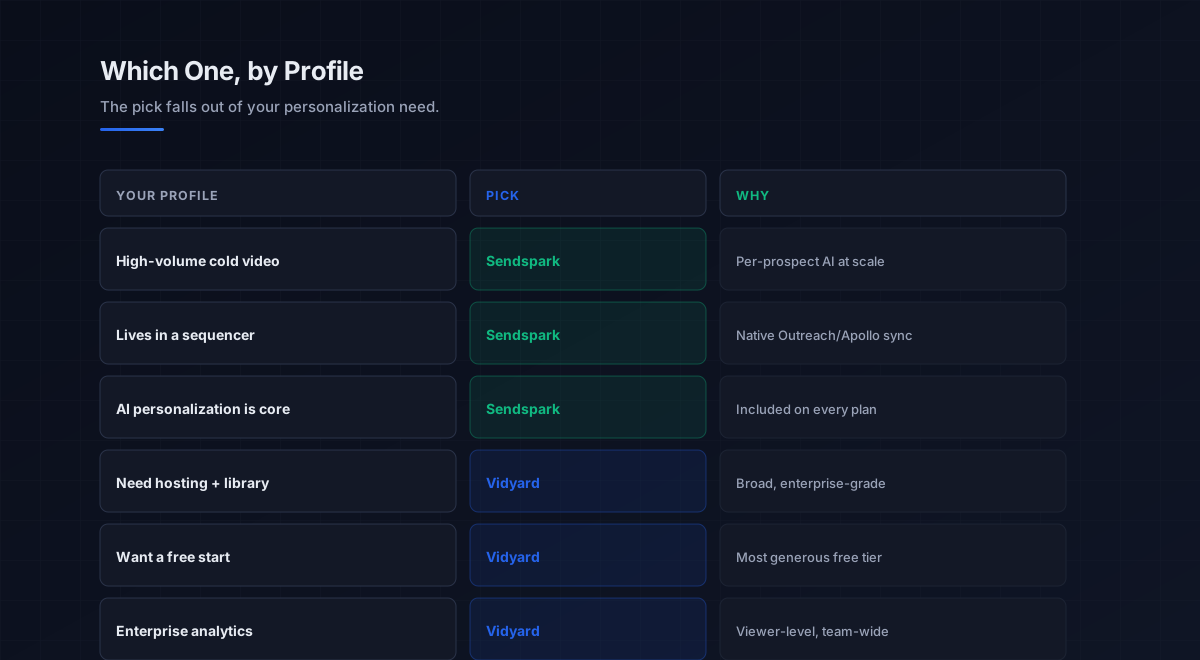
The decision in one question
Because they lead with different strengths, the cleanest way through the vidyard vs sendspark choice is a single question: how central is AI personalization at scale to your outreach. Everything else follows from the answer.
If personalization at scale is the core of your motion, recording one video to reach thousands of prospects each with their name, company, and site woven in, choose Sendspark. It is built for exactly that, includes the personalization engine on every paid plan from around 39 dollars, and plugs natively into the sequencers your reps already use. If you need a broader video platform, one place to host and manage a library, the strongest free tier to start, enterprise hosting and analytics, and personalization is an occasional rather than constant need, choose Vidyard. It is the all-rounder, and its breadth is the point.
There is a sensible blended path for some teams: start on Vidyard’s free tier to validate that video belongs in your motion at all, then move to Sendspark if and when high-volume AI-personalized outbound becomes the priority. Picking the right category in the first place is exactly what the broader best video prospecting tools guide is for, and the discipline behind the channel lives in the video prospecting pillar.
What this means for outbound teams
If you landed here because your SDR team needs video for cold outreach, Sendspark is usually the stronger pick between these two, because per-prospect personalization is what lifts cold video reply rates and that is its core design. But the more important point is the same one that holds across this whole cluster: the tool is the last layer, and even the best personalization engine is wasted if the layers beneath it are weak.
The data layer comes first: the contacts come from the b2b data providers and data enrichment tools layers, and a beautifully personalized video sent to a wrong address is wasted no matter which tool generated it. Deliverability comes next: when the video is linked from an email, that email still has to reach the inbox, so the discipline in email deliverability and sender reputation decides whether the video is ever seen. On that foundation, the tool plugs into the cold email software and sales engagement platforms that run sequences, adds a touch to LinkedIn outreach, and logs activity to the CRM software. Both tools post strong verified G2 ratings, which you can check at g2.com; fit, not score, is what should decide.
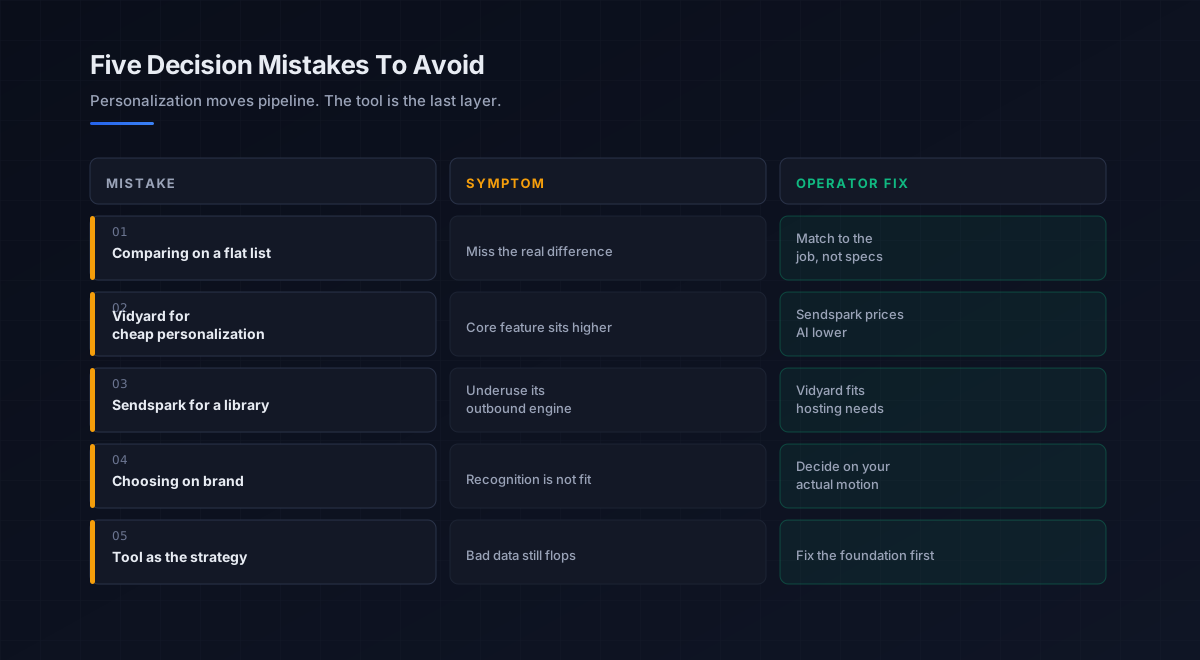
Five mistakes teams make choosing between them
What we see most often is the same handful of errors in this specific decision.
-
Comparing on a flat feature list. They look similar on paper. Match them to the job, AI personalization at scale versus broad video platform, not the spec sheet.
-
Buying Vidyard for cheap cold personalization. Vidyard’s per-prospect personalization sits on higher tiers. For scaled cold video, Sendspark prices that core feature lower.
-
Buying Sendspark for a video library. If your main need is hosting and managing a large asset library, Vidyard’s breadth and free tier fit better.
-
Choosing on brand recognition. Vidyard is better known, but recognition is not fit. Decide on the job your motion actually runs.
-
Treating the tool as the strategy. Even the best personalization engine fails on bad data and a cold domain. Fix the foundation before optimizing the tool.
An eight-step framework for the decision
This is the order we work through with the teams we work with on this specific choice. Run it before committing.
- Gauge your personalization need. Decide how central record-one-send-many AI personalization is to your outreach, the deciding factor.
- Name the job. High-volume cold video points to Sendspark; a broad hosting-plus-outreach platform points to Vidyard.
- Check sequencer fit. Confirm native sync with the sequencer your reps use, where Sendspark leans outbound-first.
- Weigh hosting and library needs. If you manage a large video library, weight Vidyard’s breadth and permissions.
- Model the real cost. Sendspark from around 39 dollars with AI included, versus Vidyard’s free tier and per-seat paid plans, against the value each unlocks.
- Use the free path. Start on Vidyard’s free tier to validate video in your motion before committing budget.
- Confirm the foundation. Verify clean data and a deliverable domain, since neither tool fixes those.
- Test both, then commit. Run a real sample through each, measure reply and completion rate, then roll out.
How this choice fits the broader stack
Whichever tool you pick, it is a channel layer that amplifies the outreach motion. Each connected layer has a deeper guide.
- The discipline. Why and how video works, in the video prospecting pillar.
- The wider field. All the leading tools by job, in best video prospecting tools.
- The other head-to-head. Sales video versus async, in vidyard vs loom.
- The email channel. Where video most often lives, in cold email software and the cold email pillar.
- The data layer. Verified contacts the video reaches, in b2b data providers and data enrichment tools.
- The cadence. How video is sequenced among touches, in sales cadence and sales engagement platforms.
- The system of record. Where video activity logs, in CRM software.
- Strategy. The motion video amplifies, in outbound sales.
That is the map. The data layer supplies verified contacts, deliverability earns the inbox, the cadence sequences the touches, and the video tool is the amplifier placed where it counts, only as effective as the foundation beneath it.
Frequently asked questions
Is Sendspark or Vidyard better in 2026?
What is the main difference between Sendspark and Vidyard?
How much do Sendspark and Vidyard cost?
Which is better for SDR cold video outreach?
Does Vidyard have AI personalization like Sendspark?
Should I use Vidyard's free tier first?
Does the tool matter more than my data and deliverability?
The bottom line
Sendspark vs Vidyard in 2026 is a closer call than most video comparisons, because both are real outbound tools, and the decision comes down to one thing: how central AI personalization at scale is to your motion. Sendspark is built for record-one-send-many cold outreach, includes its personalization engine on every paid plan from around 39 dollars, and plugs natively into the sequencers reps use, the stronger pick for high-volume SDR video. Vidyard is the all-rounder, with the strongest free tier, the deepest hosting and library management, and enterprise analytics, the better home when you need breadth and a free start. Name the job, and the Sendspark vs Vidyard choice resolves itself.
If you take one rule from this comparison, make it this: personalization moves pipeline, but the tool is still the last layer. Choose Sendspark when scaled per-prospect video is the whole game, Vidyard when you need a broad platform and a free runway, and either way, make sure the verified data and deliverable domain beneath the tool are sound, because the best video in the world only works once it reaches the right person’s inbox.
Get the operator playbook in your inbox. The Outbound Game publishes one operator-grade breakdown a week on B2B outbound sales, tactics, tooling, and ops. No fluff, no vendor talking points. Subscribe and get the next one when it ships.
More on Video Prospecting
The Best Video Prospecting Tools in 2026, Compared
The best video prospecting tools in 2026, compared by fit. Sendspark, Vidyard, Hippo Video, BombBomb, and Loom matched to motion and real pricing.
Video Prospecting in 2026: A Full Operator Playbook
Video prospecting in 2026, explained for B2B teams: why it lifts reply rates 3-5x, manual vs AI-personalized, the 90-second rule, and what actually works.
Video Prospecting Best Practices: A 2026 Field Guide
Video prospecting best practices for 2026: ideal length, the personalization that drives 25-30% reply rates, and where to place video in the sequence.