Vidyard vs Loom in 2026: A Full Operator Comparison
Vidyard vs Loom in 2026, compared by job. The sales video platform vs the async standard: real pricing, CRM sync, and which one fits your team.
The honest answer to Vidyard vs Loom in 2026 is that they are not really competing for the same job, and once you see that, the decision gets simple. Vidyard is a sales-focused video platform built to push video engagement into your CRM and sequencer. Loom is the category-defining async communication tool, built for fast, frictionless internal video: product walkthroughs, support docs, engineering handoffs. They look similar on the surface, a record button, a shareable link, but they solve fundamentally different problems and price accordingly, so picking the wrong one means either overpaying for sales features you will never touch or missing the integrations your reps actually need.
Get that framing right and the choice almost makes itself. If your team is doing outbound sales and lives in Salesforce or HubSpot, you want CRM-connected analytics, viewer-level engagement data, and sequencer integrations, and that is Vidyard. If you need quick async video for internal communication on a budget, that is Loom, at roughly a third of the price. The trap is treating this as a feature contest when it is really a question of what you are trying to accomplish with video. This guide compares them the way an operator actually decides: by job first, then by price.
This is a head-to-head inside the video prospecting cluster, where Vidyard anchors the all-rounder sales category and Loom sits outside outbound entirely. For the wider field, see the best video prospecting tools comparison. Whichever you choose rides on top of your cold email and LinkedIn outreach motions and logs into your CRM software.
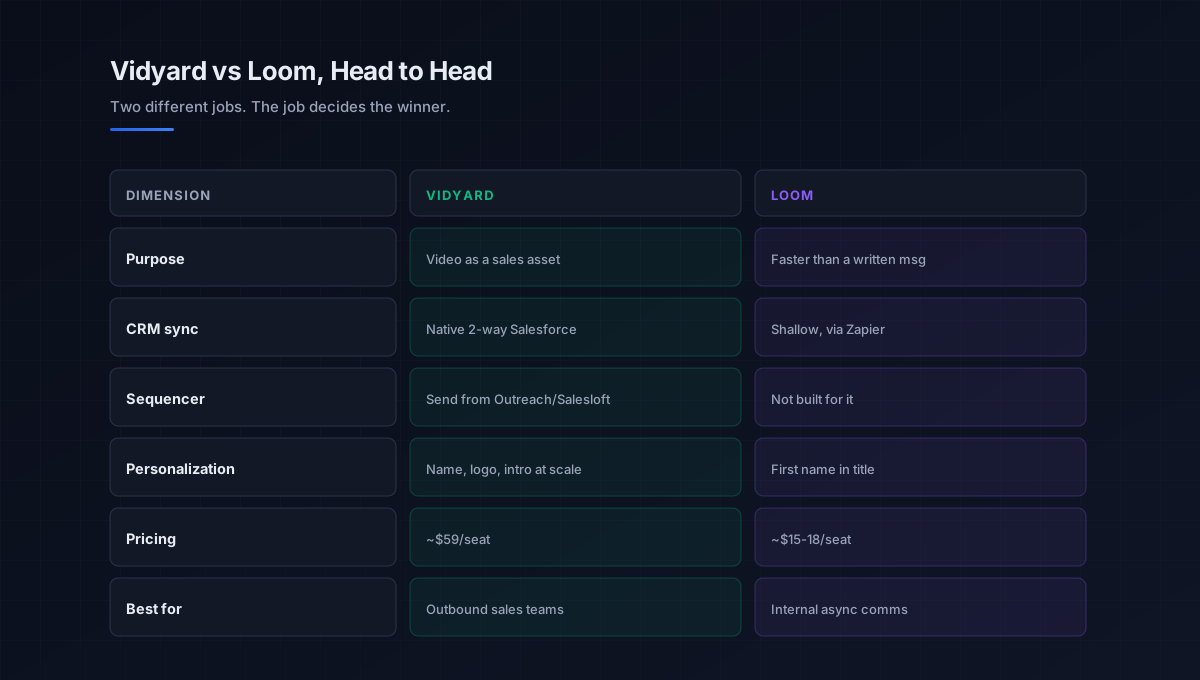
Where the two genuinely differ
They overlap on the basics, screen and webcam recording, hosting, a shareable link, so focus on the dimensions where the experience and the economics actually diverge. This is what should drive the decision.
Design purpose
Vidyard treats video as a sales asset. Its whole design points at revenue: viewer identification, engagement scoring, and personalized prospecting flows. Loom treats video as a faster alternative to a written message, optimized for speed and ease so anyone can record and share in seconds. One is a sales engagement tool that happens to use video; the other is an async communication tool that happens to be used by some sales teams.
CRM and sequencer integration
This is the sharpest practical difference. Vidyard offers native two-way Salesforce sync (video views log as activity, attach to deals, trigger workflows), HubSpot sequence embedding with view data on contact records, and native sending from inside Outreach and Salesloft. Loom’s integrations point at async work, Slack, Notion, Jira, GitHub, Linear, with its CRM story running mostly through Zapier or shallow native links that embed a video and log a basic activity. If your reps live in Salesforce and a sequencer for B2B prospecting, Vidyard plugs in; Loom needs glue.
Personalization
Vidyard’s personal prospecting flow lets a rep record one base video and swap in the prospect’s name on a whiteboard, the company logo on a screen, or a custom intro, the personalized video at scale that outbound depends on. Loom’s personalization stops at putting a first name in the title. For an SDR team running outbound video, that gap alone often justifies Vidyard’s price.
Pricing
The economics are blunt. Loom pricing runs about 15 to 18 dollars a user for the Business plan, while Vidyard pricing for the paid sales tier starts around 59 dollars a seat (89 if billed monthly), roughly 3.3x the price, with an AI add-on pushing it higher. Both offer free tiers (Loom around 25 videos, Vidyard around 5 a month). The gap is not arbitrary: Vidyard’s price makes sense compared to other sales tools like Outreach and Salesloft, not compared to a general screen recorder. For non-sales teams, that premium buys features you will not use.
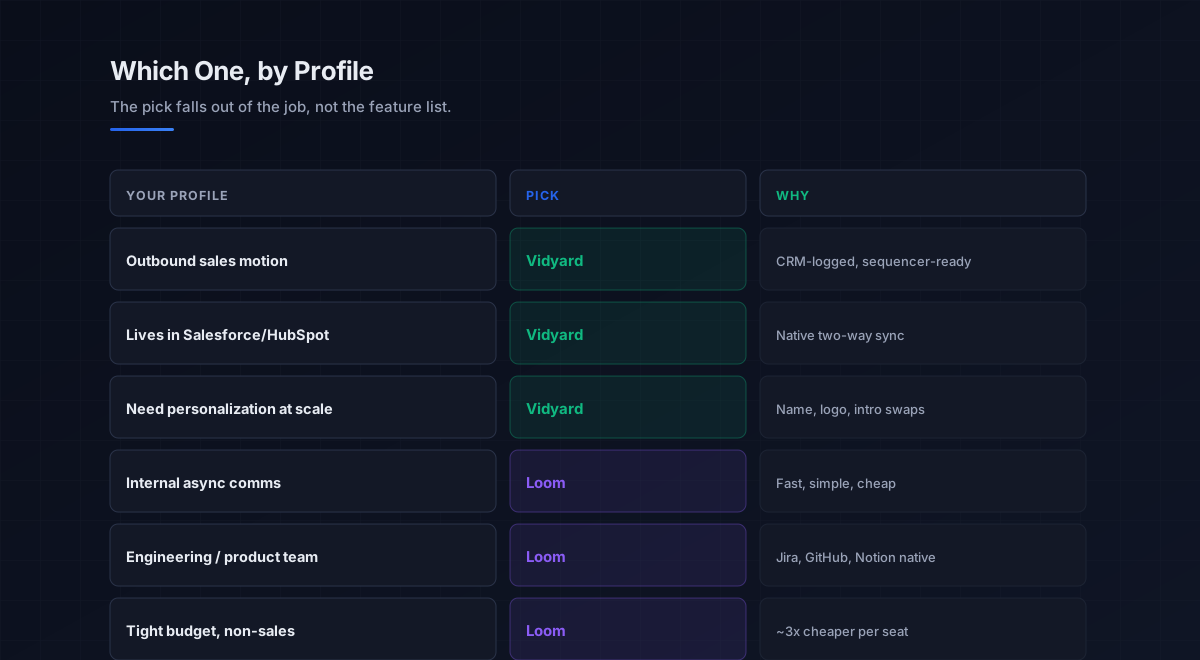
The decision in one question
Because they fit different jobs, the cleanest way through the loom vs vidyard choice is a single question: is this tool going to carry outbound sales prospecting, or internal and async communication. Everything else follows from the answer.
If the answer is outbound sales, choose Vidyard. The CRM-connected analytics, viewer identification, sequencer sending, and personalization at scale are exactly what an SDR or marketing team running video outreach needs, and the 59-dollar price sits comfortably next to the other sales tools in the stack. If the answer is internal communication, product walkthroughs, support documentation, engineering handoffs, team updates, choose Loom. It is faster, simpler, a third of the cost, and its async-work integrations (Slack, Jira, Notion) are exactly where those videos belong.
There is a third path some organizations take: run both, Loom for internal async and Vidyard for external sales. That is valid when sales and operations budgets are separate, but it adds tool-management overhead, so before committing to both, it is worth checking whether Loom’s higher Enterprise tier (which adds Salesforce integration) could stretch to cover a light sales need, or whether Vidyard alone could serve both. This connects to picking the right category in the broader best video prospecting tools guide.
What this means for outbound teams
If you landed here because someone said “we need a video tool for outbound,” the answer is Vidyard between these two, but the more important point is what sits underneath the tool. Vidyard is the right pick for sales video, yet it is still only one layer in the motion, and its analytics and personalization are wasted if the layers beneath it are weak.
The data layer comes first: the contacts come from the b2b data providers and data enrichment tools layers, and a personalized video sent to a wrong address is wasted no matter how good Vidyard’s reporting is. Deliverability comes next: when the video is linked from an email, that email still has to reach the inbox, so the discipline in email deliverability and sender reputation decides whether the video is ever seen. On that foundation, Vidyard plugs into the cold email software and sales engagement platforms that run the sequences, adds a touch to LinkedIn outreach, and logs activity to the CRM software. The discipline behind using video well lives in the video prospecting pillar.
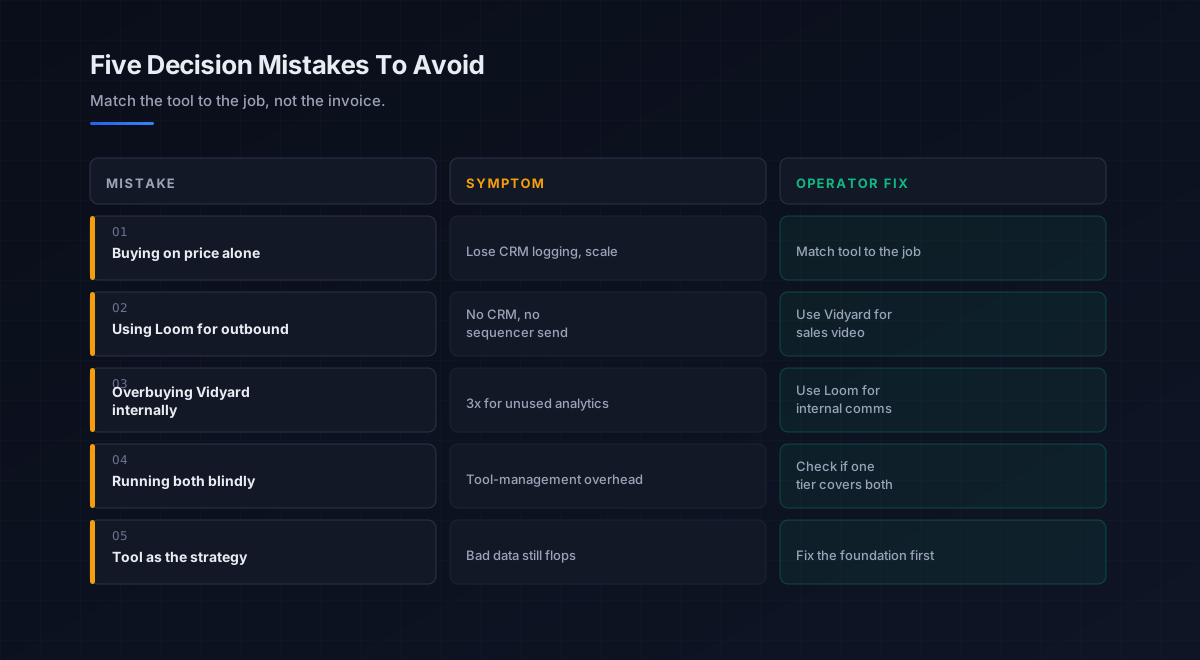
Five mistakes teams make choosing between Vidyard and Loom
What we see most often is the same handful of errors in this specific decision.
-
Buying on price alone. Loom is cheaper, but if you need CRM-logged video and personalization, the savings cost you the result. Match the tool to the job, not the invoice.
-
Using Loom for outbound. Loom cannot log views to your CRM, personalize at scale, or send from the sequencer. For outbound video, that is a dealbreaker, not a quirk.
-
Overbuying Vidyard for internal use. Paying 3x for sales analytics an internal team never opens is waste. For internal comms, Loom is the right tool.
-
Running both without checking overlap. Two tools add management overhead. Before committing, check whether one tier could cover both needs.
-
Treating the tool as the strategy. Even Vidyard is the last layer. A great video on bad data and a cold domain underperforms text. Fix the foundation first.
An eight-step framework for the Vidyard vs Loom decision
This is the order we work through with the teams we work with on this specific choice. Run it before committing.
- Name the primary job. Decide whether the tool carries outbound sales or internal communication, the single deciding question.
- Check where your reps live. Salesforce, HubSpot, and a sequencer point to Vidyard; Slack, Jira, and Notion point to Loom.
- Weigh personalization need. If you need personalized video at scale, Vidyard; if a name in the title suffices, Loom.
- Model the real cost. Loom around 15 to 18 dollars a seat versus Vidyard around 59, plus any AI add-on, against the value each unlocks.
- Check the free tiers. Test adoption on Loom’s or Vidyard’s free plan before paying, since video only works if reps use it.
- Consider the both-tools path. Only if budgets are separate and one tier genuinely cannot cover the other need.
- Confirm the foundation. For the sales case, verify clean data and a deliverable domain before relying on any video tool.
- Pilot, then commit. Run the finalist on real use for a few weeks, measure adoption and engagement, then roll out.
How Vidyard vs Loom fits the broader stack
For the sales case, the video tool is a channel layer that amplifies the outreach motion. Each connected layer has a deeper guide.
- The discipline. Why and how video works, in the video prospecting pillar.
- The wider field. All the leading tools by job, in best video prospecting tools.
- The email channel. Where sales video most often lives, in cold email software and the cold email pillar.
- LinkedIn. Video DMs and social touches, in LinkedIn outreach.
- The cadence. How video is sequenced among touches, in sales cadence and sales engagement platforms.
- The data layer. Verified contacts the video reaches, in b2b data providers.
- The system of record. Where video activity logs, in CRM software.
- Strategy. The motion video amplifies, in outbound sales.
That is the map. For outbound, Vidyard is the right pick between these two, but it is only as effective as the data, deliverability, and cadence beneath it; for internal video, Loom is the simpler, cheaper fit and the comparison ends there.
Frequently asked questions
Is Vidyard or Loom better in 2026?
Is Loom cheaper than Vidyard?
Can I use Loom for sales prospecting?
Why is Vidyard so much more expensive than Loom?
Should I use both Vidyard and Loom?
Which is better for personalized video outreach?
Does the Vidyard vs Loom choice matter more than my data?
The bottom line
Vidyard vs Loom in 2026 is not a contest of which is better, but of which job you are solving. Vidyard is the sales video platform, CRM-connected analytics, viewer identification, sequencer sending, and personalization at scale, worth its roughly 3.3x price premium when a sales team runs outbound video and lives in Salesforce or HubSpot. Loom is the async communication standard, fast, simple, and a third of the cost, the right fit for internal walkthroughs, support docs, and team updates. Decide which job the tool is carrying, and the choice resolves itself.
If you take one rule from this comparison, make it this: match the tool to the job, not the invoice. Buying Loom for outbound saves money and loses the result; buying Vidyard for internal comms pays 3x for analytics nobody opens. And for the sales case, remember that even the right tool is only an amplifier, verified data and a deliverable domain are what make the personalized video land, so fix the foundation first and let the tool do what it does well.
Get the operator playbook in your inbox. The Outbound Game publishes one operator-grade breakdown a week on B2B outbound sales, tactics, tooling, and ops. No fluff, no vendor talking points. Subscribe and get the next one when it ships.
More on Video Prospecting
The Best Video Prospecting Tools in 2026, Compared
The best video prospecting tools in 2026, compared by fit. Sendspark, Vidyard, Hippo Video, BombBomb, and Loom matched to motion and real pricing.
Sendspark vs Vidyard in 2026: A Full Operator Guide
Sendspark vs Vidyard in 2026, compared by job. AI personalization at scale vs the all-rounder: real pricing, integrations, and which one fits your team.
Video Prospecting in 2026: A Full Operator Playbook
Video prospecting in 2026, explained for B2B teams: why it lifts reply rates 3-5x, manual vs AI-personalized, the 90-second rule, and what actually works.