How to Use LinkedIn Sales Navigator for Prospecting
How to use LinkedIn Sales Navigator for prospecting in 2026: the account first workflow, spotlight filters, saved searches, and the export bridge.
Learning how to use LinkedIn Sales Navigator well starts with a reframe: it is not a messaging tool with a search bar, it is the freshest B2B database on earth with a query language, and the query is the skill. The data advantage is structural, because people update LinkedIn before anywhere else when they change jobs, which is why a platform of a billion self maintained profiles beats any scraped database on freshness. The commercial results track it: LinkedIn commissioned research puts Sales Navigator at 312 percent ROI over three years with deals sourced through it running 42 percent larger, and the practical rule of thumb is that any team selling deals above roughly 2,000 dollars a year clears the subscription cost with a single incremental win per quarter.
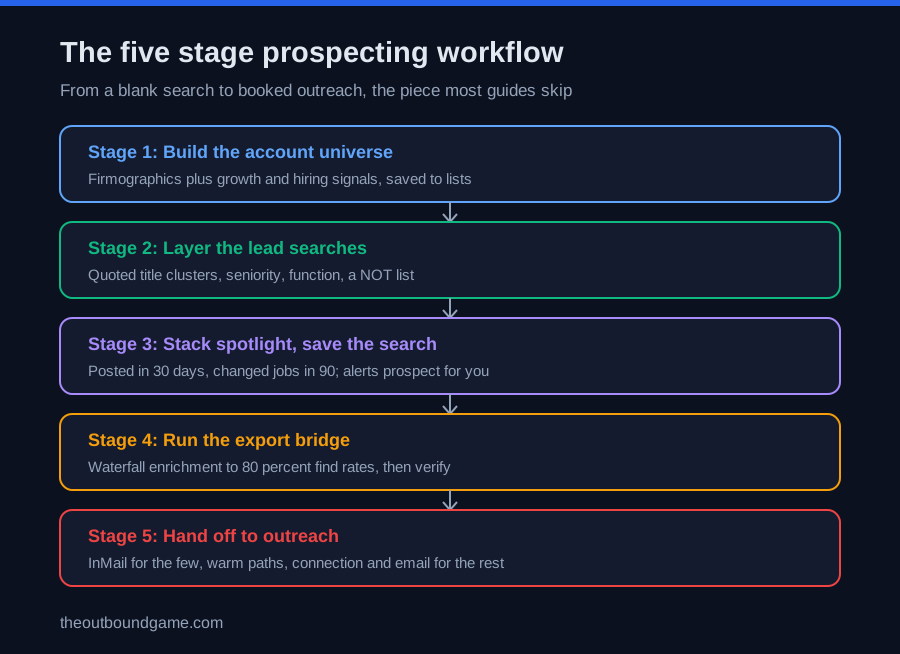
The 2026 pricing: Core at 89.99 dollars a month on annual billing carries the essentials, 40 plus search filters against free LinkedIn’s roughly 10, saved searches, lead and account lists, and 50 monthly InMail credits, while Advanced at about 150 adds TeamLink warm paths, buyer intent, and CSV account uploads, and Advanced Plus adds CRM writeback at custom pricing. The plan decision itself is covered in linkedin sales navigator vs premium and the full product review in linkedin sales navigator; this guide is the operating workflow, five stages from a blank search to booked outreach, the piece most guides skip.
One boundary before the stages: Sales Navigator is built for precision, not volume. It finds and tracks the right 50 to 500 people better than anything on the market, and it deliberately does not give you their emails, export buttons, or sending infrastructure, which is why stages four and five, the export bridge and the outreach handoff, decide whether the subscription produces pipeline or just impressive lists.
Stage one: accounts first, people second
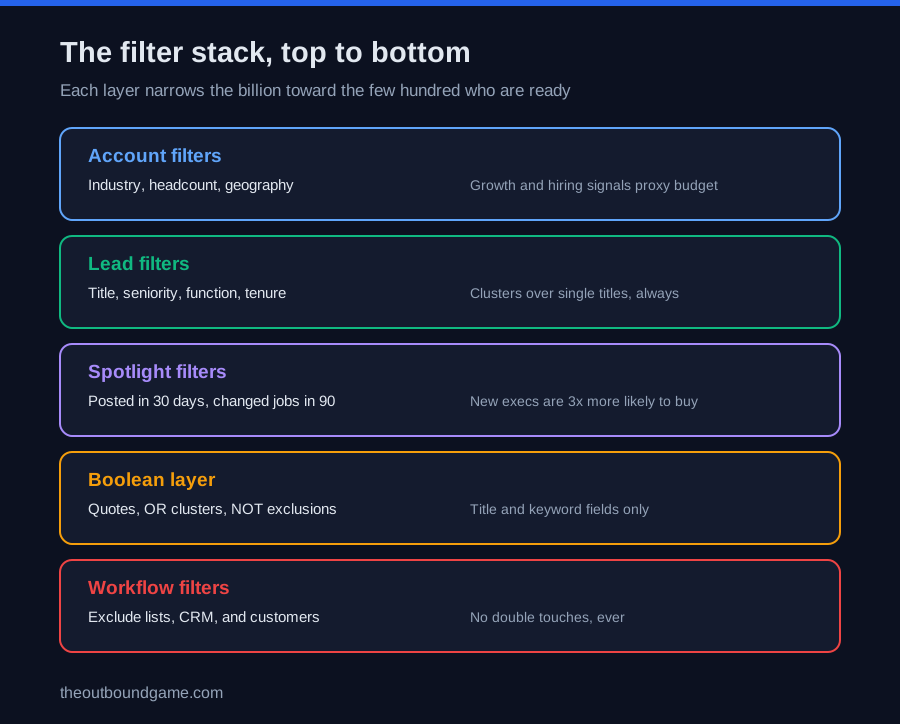
The rule that separates working searches from noisy ones: find the right companies with account filters first, then find the right people inside them with lead filters. Account search carries the firmographic layer, industry, headcount, geography, and the growth signals that proxy for budget: a company that grew headcount 50 percent in a year, is actively hiring, or just raised is a categorically better prospect than one that has been flat for three years, and the Company Growth and hiring filters surface exactly that. Save the winners into account lists, which become the container your whole motion runs from, with alerts on funding, leadership changes, and news.
Then lead search operates inside those saved accounts: job title plus seniority finds the decision makers, function separates the owner of your problem from adjacent titles, and Years in Current Position splits new arrivals hungry to make changes from veterans who hold budget. This account first discipline is the same one that governs how to build a b2b prospect list, because the account list, not the lead list, is the asset that compounds.
Stage two: boolean search and the spotlight layer
Boolean search is the query language, and it works in the title and keyword fields only: quotes for exact phrases, so a multi word title like a marketing VP search is always wrapped in quotes or it matches three separate words; OR for title clusters, since real decision makers hide behind VP, Head of, and Director variants; NOT to exclude the assistants, advisors, and interns that pollute broad matches. Keep boolean simple and layered on top of structured filters rather than replacing them, and build several focused searches instead of one giant one, both for cleanliness and because results cap at 2,500 per search, so segmenting by geography or headcount is also how you see everything.
Spotlight filters are the intent layer and the most underused feature in the product. Posted on LinkedIn in the past 30 days restricts results to people who will actually see a message; Changed Jobs in the past 90 days surfaces new executives, who are roughly three times more likely to buy new solutions and carry 90 day mandates with fresh budget; Mentioned in News and Shared Experiences add openers. Stacking an active poster with a recent job change inside a growing account is the highest intent query the platform can express, and that stack is precisely the buyer intent most teams pay separate tools to approximate.
Stage three: saved searches, the self refreshing pipeline
A saved search runs in the background daily and alerts you when new people or companies match, which quietly converts Sales Navigator from a search tool into a signal engine: set the ICP criteria once and new matching prospects arrive on their own, up to 50 saved lead searches per seat. The working pattern is 5 to 10 saved searches split by segment, persona, or territory, each stacked with a spotlight filter so the alerts arrive pre qualified, plus account level alerts on your named lists for funding, hiring, and job changes, the same trigger events that power how to personalize cold emails at scale.
Two disciplines keep the engine honest. Review and refine every saved search on a 2 to 4 week cycle, because title conventions drift, ICPs evolve, and a stale search generates alert fatigue until reps stop opening notifications entirely. And use workflow filters to exclude people already in your lists, your CRM, or your customer base, which prevents the embarrassing double touch and keeps every alert genuinely new.
Stages four and five: the export bridge and the outreach handoff
Here is the step most guides skip: Sales Navigator gives you names, titles, and companies, but no emails, no phone numbers, and no native export. Lead lists cap at viewing 2,500 results per search and the bridge to outreach is external: pull the list via a compliant export tool or integration, then enrich it, and the enrichment method matters, since single source lookups find contact data for roughly 40 to 60 percent of prospects while waterfall enrichment through platforms like Clay queries many vendors in sequence and reaches 80 percent plus, with Apollo covering the single platform path from list to verified email to sequence. Verify everything before sending, per the bounce thresholds that govern all outbound.
The outreach itself then splits by channel. InMail carries 50 credits a month, spent only on high value targets, with Open profiles costing nothing; connection plus message sequences run through the craft in linkedin outreach; TeamLink, on Advanced, routes warm introductions through colleagues, worth roughly five times a cold InMail’s reply rate by LinkedIn’s own data; and the email leg runs through your sequencer under the sales cadence rhythm. For scaled LinkedIn sending, the automation tier compared in linkedin automation tools and dripify vs expandi pulls searches by URL, with one law governing all of it: automation amplifies targeting, so a tight search scales beautifully and a sloppy one produces garbage at volume.
Five Sales Navigator mistakes that waste the seat
-
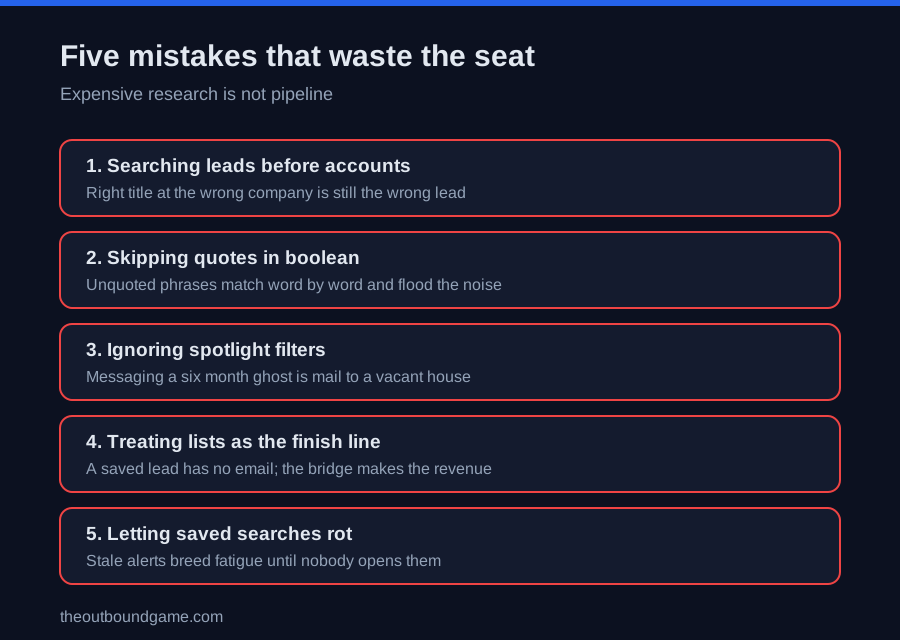
Searching leads before accounts. People first searches produce right title, wrong company matches. Firmographics first, humans second, always.
-
Skipping quotes in boolean search. An unquoted multi word title matches each word separately and floods results with noise. Quote every exact phrase.
-
Ignoring the spotlight filters. Messaging someone who has not logged in for six months is mail to a vacant house. Activity and job change filters are the difference between a list and a pipeline.
-
Treating lists as the finish line. A saved lead has no email and no sequence. Without the enrichment bridge, the seat produces research, not revenue.
-
Letting saved searches rot. A search tuned to last year’s titles fires stale alerts until nobody reads them. Two to four week reviews keep the engine credible.
The eight step Sales Navigator operating system
-
Write the ICP before touching a filter. Closed won evidence, exact title clusters, firmographic bounds. The query is only as good as the definition behind it.
-
Build the account universe. Account filters plus growth signals, saved into named account lists with alerts on.
-
Layer the lead searches inside it. Title clusters in quotes with OR logic, seniority, function, and a NOT list for the noise.
-
Stack a spotlight on every search. Posted in 30 days as the default, changed jobs in 90 for the hot segment.
-
Save 5 to 10 segmented searches and let the daily alerts replace manual prospecting, reviewed on a 2 to 4 week cycle.
-
Run the weekly export bridge. List out, waterfall enrichment, verification, and into the sequencer, the same pipeline the best data enrichment tools roundup compares.
-
Spend InMail like money. Fifty credits go to Open profiles and the highest value targets; everyone else enters the connection or email path.
-
Measure the seat on meetings sourced, not lists built, the only number that justifies the subscription inside the broader b2b outbound sales system.
How Sales Navigator fits the broader outbound stack
-
The buy or skip decision and plan tiers live in linkedin sales navigator and linkedin sales navigator vs premium.
-
The list discipline it executes is defined in how to build a b2b prospect list, account first there too.
-
Its signals feed the personalization assembly line in how to personalize cold emails at scale.
-
Its export bridge runs on the platforms in best data enrichment tools, where waterfall beats single source.
-
Its messaging craft lives in linkedin outreach, connection notes, InMail, and the follow up rhythm.
-
Its scaled sending layer is compared in linkedin automation tools and the head to head in dripify vs expandi.
-
Its touches slot into the multichannel sales cadence, where LinkedIn interleaves with calls and email.
-
And the emails it ultimately powers follow the craft in cold email, where the signal it found becomes the opening line.
FAQ
Frequently asked questions
How do you use LinkedIn Sales Navigator for prospecting?
Is LinkedIn Sales Navigator worth it in 2026?
What are the best Sales Navigator filters?
How do saved searches work in Sales Navigator?
Can you export leads from Sales Navigator?
What is the difference between lead filters and account filters?
How many InMails do you get with Sales Navigator?
The bottom line
How to use LinkedIn Sales Navigator comes down to running it as the query engine it is: accounts before people, boolean and spotlight layers turning a billion profiles into a few hundred high intent targets, saved searches converting the whole thing into a self refreshing pipeline, and a weekly export bridge that turns lists into verified, sequenced outreach. The seat pays for itself where deals are meaningful and the workflow exists, and it quietly wastes 90 dollars a month wherever it ends at a lead list. Build the five stages once, review the searches monthly, and the freshest database in B2B starts delivering its one real product: the right conversation, with the right person, at the moment their profile says they are ready to have it.
Want more tested breakdowns like this? We publish one honest teardown of outbound tools, tactics, and playbooks each week. Join the newsletter.
More on Prospecting Tools
How to Find Email Addresses for Cold Outreach in 2026
How to find email addresses in 2026: the five methods ranked by find rate, the waterfall that reaches 85 percent, and the verification gate that matters.
How to Build a B2B Prospect List in 2026 (Step by Step)
How to build a b2b prospect list in 2026: the seven step system, the reverse funnel math, sourcing paths compared, and the quality benchmarks that matter.