Dripify vs Expandi in 2026: A Full Operator Verdict
Dripify vs Expandi in 2026, compared by job. The affordable all-rounder vs the premium safety play: real pricing, the ban risk, and which one fits.
The honest answer to Dripify vs Expandi in 2026 is that the feature gap has narrowed to the point where the decision comes down to two things, price and how central LinkedIn is to your pipeline, and not much else. Both are popular cloud-based LinkedIn automation tools that run your campaigns on their servers around the clock, sending connection requests, follow-up messages, and profile visits on LinkedIn while simulating human behavior to stay under the radar. Dripify is the affordable, easy-to-use all-rounder: roughly 40 to 60 percent cheaper, with a built-in email finder, native CRM integrations, and a higher user rating. Expandi is the premium safety play: a dedicated IP address per account, warm-up features, and the multi-channel depth that agencies and serious LinkedIn-first teams pay up for.
That framing decides it, because the old feature-by-feature shootout no longer separates them cleanly. Dripify starts around 39 to 79 dollars a month and carries a G2 rating near 4.5, making it the better value for solo reps and budget-conscious teams, especially when LinkedIn is a supplementary channel alongside cold email. Expandi runs about 99 to 149 dollars a seat, and that premium buys the dedicated IP and safety infrastructure that matter most when your LinkedIn account is a primary revenue channel too valuable to risk on shared infrastructure. This guide compares them the way an operator running B2B prospecting actually decides: by budget, by how much you lean on LinkedIn, and by the one risk neither vendor puts on the homepage.
This is a head-to-head inside the linkedin outreach cluster, which covers the channel at the pillar level, with linkedin automation tools on the wider field and linkedin sales navigator on the data source that feeds either tool. Whichever you pick runs on top of a sound sales cadence and the contacts from your b2b data providers.
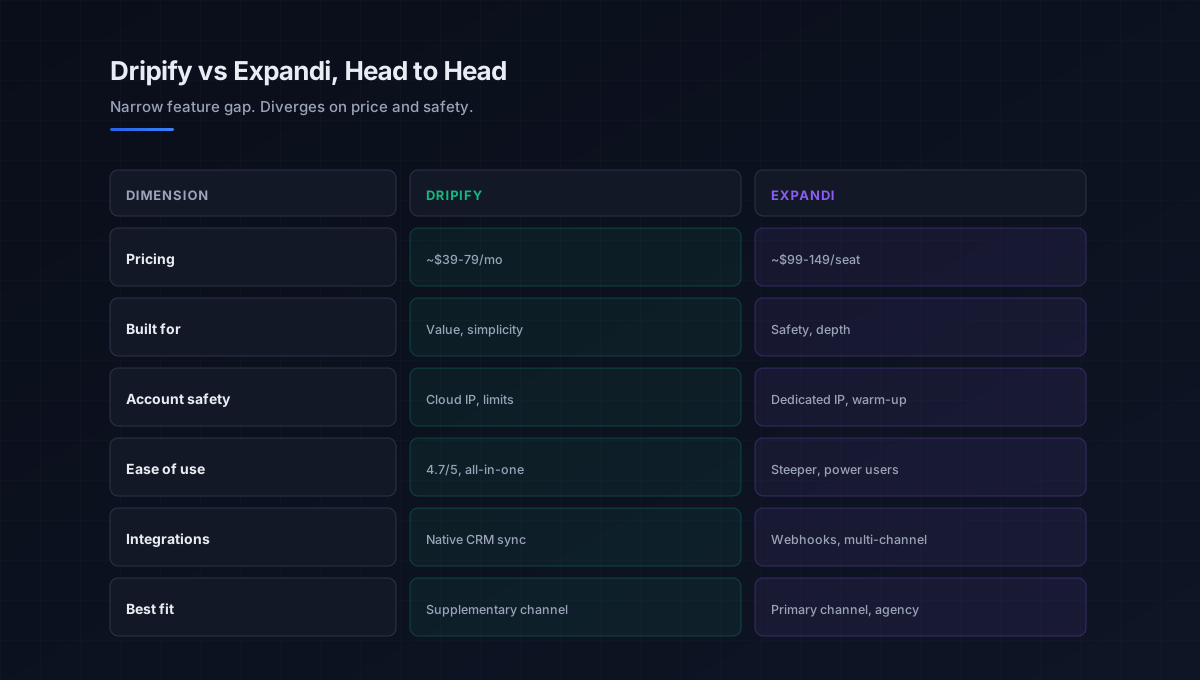
Dripify vs Expandi: where the two genuinely differ
Both run cloud-based drip campaigns with connection requests, messaging, and conditional logic, so focus on the dimensions where they actually diverge, because that is what should settle the choice.
Pricing and value
This is the starkest difference. Dripify pricing starts around 39 dollars a month billed annually (about 59 on the Pro plan, up to 79), while Expandi starts near 99 dollars a seat and climbs to 149, making Dripify roughly 40 to 60 percent cheaper for comparable basic use. For a solo rep or small team, that gap is decisive, and it is why Dripify owns the budget and supplementary-channel segment. Expandi’s higher price reflects its safety infrastructure rather than more campaign features, so the question is whether you need that infrastructure.
Account safety
This is Expandi’s clearest edge and the single strongest reason to pay its premium. Each Expandi account gets a dedicated IP address, smart warm-up that gradually ramps activity, and cloud infrastructure tuned to mimic human behavior patterns, the highest safety ceiling among single-user LinkedIn tools. Dripify approaches safety with a dedicated cloud IP, activity limits, and randomized delays too, but with simpler controls and without per-account warm-up at the same depth. If your LinkedIn account is irreplaceable, Expandi’s safety margin is the differentiator; for lighter use, Dripify’s controls are adequate.
Ease of use and all-in-one features
This is Dripify’s clearest edge. It is built for fast, intuitive setup, with a 4.7 out of 5 ease-of-use rating on Capterra, and it bundles an email finder and verification plus a filtered smart inbox, making it a genuine all-in-one for straightforward outreach. Expandi is more sophisticated and configurable but has a steeper learning curve aimed at power users and agencies. A solo rep who wants to launch this week leans Dripify; an agency that wants deep control leans Expandi.
Integrations and multi-channel
This is where Expandi pulls ahead for complex motions while Dripify wins on simplicity. Dripify offers native CRM integrations with HubSpot, Salesforce, Pipedrive, and others, plus Zapier, ideal for a clean LinkedIn-to-CRM flow. Expandi leans on webhooks and Zapier rather than native connectors but offers deeper multi-channel sequences that blend LinkedIn actions with email. If you want native CRM sync, Dripify; if you want sophisticated multi-channel orchestration, Expandi.
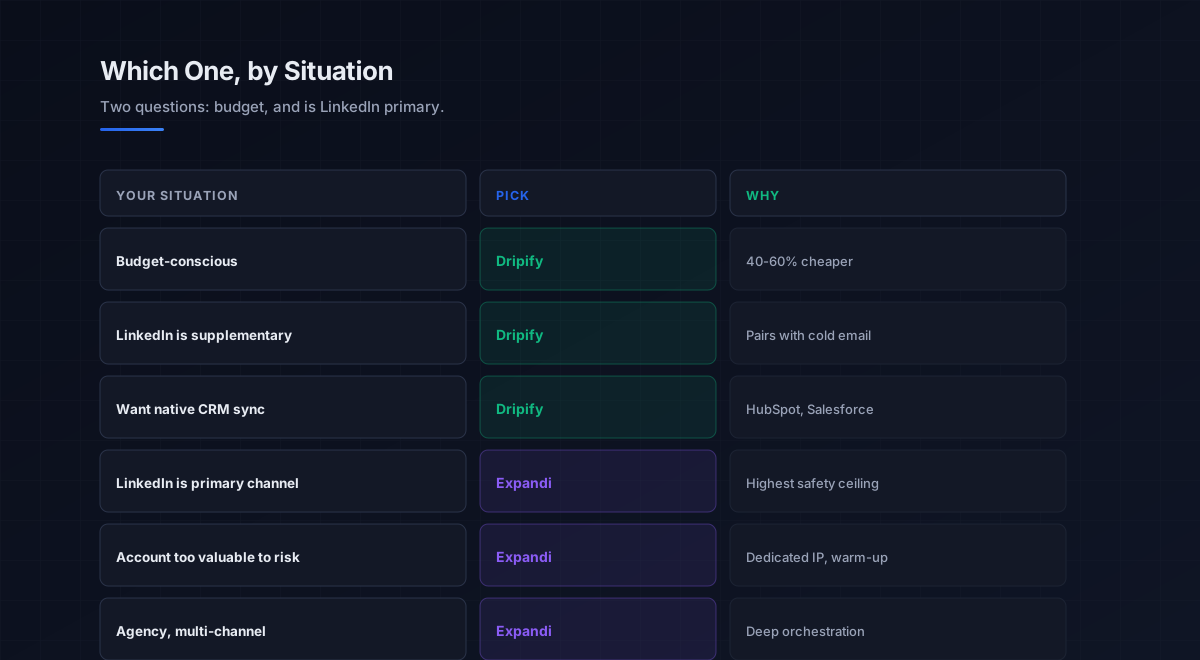
The decision in two questions
Because the feature gap is narrow, the cleanest way through the expandi vs dripify choice is two questions: what is your budget, and is LinkedIn a primary or supplementary channel. The answers resolve it faster than any feature grid.
If you are a solo rep or small team, budget-conscious, using LinkedIn as a supplementary channel alongside cold email, and you want an easy setup with native CRM sync and a built-in email finder, choose Dripify. At roughly 40 to 60 percent less than Expandi, with a higher ease-of-use rating, it delivers the core automation most teams need without the premium. If LinkedIn is a primary revenue channel, your account is too valuable to risk on shared infrastructure, and you want the dedicated IP, deeper warm-up, and multi-channel sequences, choose Expandi. The safety ceiling and orchestration justify the higher seat price for LinkedIn-first and agency motions.
There is no real third path on core dialing-style mechanics here, since both run the same kind of cloud drip campaigns; the premium is for safety infrastructure and multi-channel depth, not more outreach. The wider field of these tools sits in the linkedin automation tools guide, the channel discipline in the linkedin outreach pillar, and the data source that feeds both in linkedin sales navigator and linkedin sales navigator vs premium.
The risk that frames the whole decision
If you take nothing else from this comparison, take this: the tool is the second decision, and the account is the first, because all LinkedIn automation carries a real risk of restriction or a ban, and no platform removes it. LinkedIn actively detects and limits automated behavior, and it has been tightening those limits, so a tool’s human-behavior simulation reduces the risk but never eliminates it. The fastest way to lose is to point aggressive automation at a valuable personal profile and have it flagged, since the network you spent years building does not come back with a support ticket.
That is why the protective rules matter more than the tool choice, and why they are the same on either platform: stay well under LinkedIn’s daily action limits, warm the account up gradually rather than going full-volume on day one, and never automate a profile you cannot afford to lose. The tool only amplifies the targeting beneath it, so a sharp ICP and a relevant, personalized message do more for results and safety than any setting, since automating the wrong message to the wrong people gets you ignored or reported faster. The contacts that targeting depends on come from the b2b data providers and data enrichment tools layers, the sequencing logic from the sales cadence guide, and the broader motion from the outbound sales playbook. Protect the account first, then let the tool amplify a motion that already works.
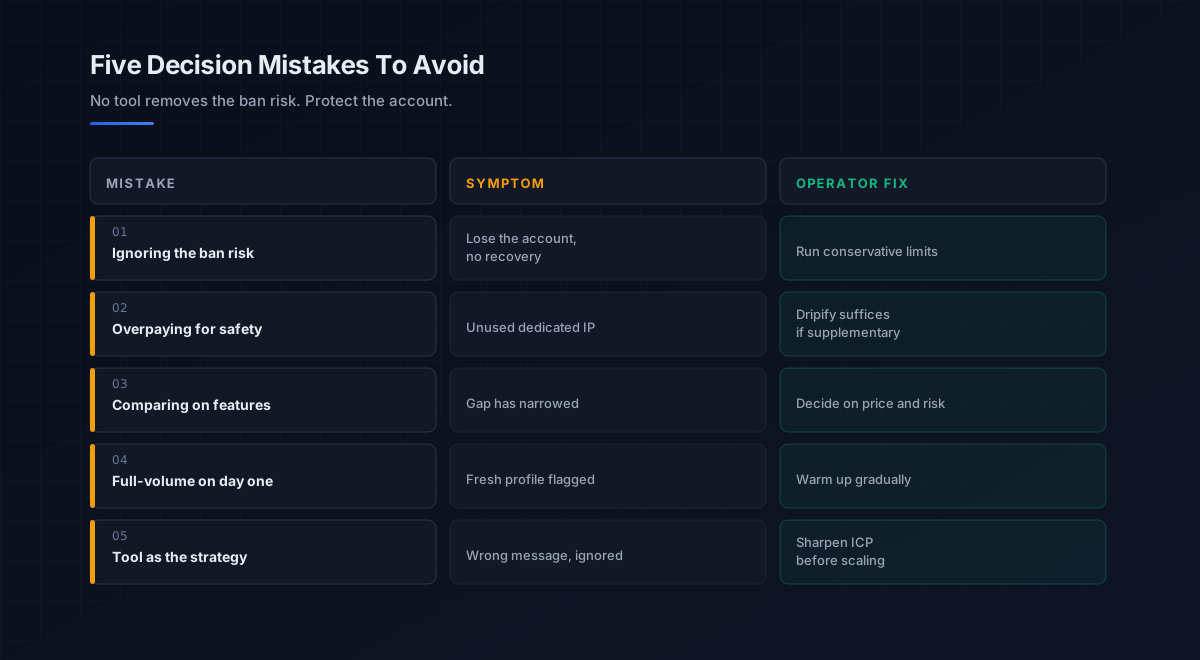
Five mistakes teams make choosing between them
What we see most often is the same handful of errors in this specific decision.
-
Ignoring the ban risk. No tool removes it, and LinkedIn keeps tightening. Run conservative limits and never automate an irreplaceable account.
-
Overpaying for unused safety. Expandi’s dedicated IP is worth it only if LinkedIn is a primary channel. For supplementary use, Dripify’s controls suffice.
-
Comparing on features alone. The gap has narrowed; both run the same core campaigns. Decide on price, channel priority, and risk tolerance.
-
Going full-volume on day one. Aggressive limits on a fresh or valuable profile invite a flag. Warm up gradually on either platform.
-
Treating the tool as the strategy. Automation amplifies targeting; it does not fix a vague ICP. Sharpen the list and message before scaling outreach.
An eight-step framework for the decision
This is the order we work through with the teams we work with on this specific choice. Run it before subscribing.
- Weigh the account risk. Decide how valuable the profile is and how much you can afford to risk, the question that frames everything.
- Name the channel priority. Decide whether LinkedIn is primary or supplementary to your other outbound.
- Set the budget. Compare Dripify’s roughly 39 to 79 dollars against Expandi’s 99 to 149 a seat against your channel priority.
- Match the tool. Supplementary and budget-conscious points to Dripify; LinkedIn-first and safety-critical points to Expandi.
- Check integrations. Confirm native CRM sync with Dripify or multi-channel orchestration with Expandi, depending on your stack.
- Sharpen the targeting. Tighten your ICP and message, since the tool only amplifies what you feed it.
- Set conservative limits. Plan daily action caps well under LinkedIn’s thresholds and a gradual warm-up on either tool.
- Trial, then commit. Run a small, safe campaign through your pick, measure acceptance and reply rates, then scale carefully.
How this choice fits the broader stack
Whichever tool you pick, it is a channel layer that automates LinkedIn outreach. Each connected layer has a deeper guide.
- The channel. Why and how LinkedIn outreach works, in the linkedin outreach pillar.
- The wider field. All the automation tools by job, in linkedin automation tools.
- The data source. Where targeting comes from, in linkedin sales navigator and linkedin sales navigator vs premium.
- The contact data. What feeds the targeting, in b2b data providers and data enrichment tools.
- The cadence. How LinkedIn sequences with other touches, in sales cadence.
- The email channel. What LinkedIn pairs with, in cold email software.
- The system of record. Where activity logs, in crm software.
- Strategy. The motion the tool amplifies, in outbound sales.
That is the map. The data source supplies the targeting, the tool automates the touches, the cadence sequences them, and the account safety underpins all of it, with the tool only as valuable as the targeting and the profile it runs on.
Frequently asked questions
Is Dripify or Expandi better in 2026?
What is the main difference between Dripify and Expandi?
How much do Dripify and Expandi cost in 2026?
Which is safer, Dripify or Expandi?
Can LinkedIn automation get my account banned?
Which is better for an agency managing multiple accounts?
Does the tool matter more than my targeting and account?
The bottom line
Dripify vs Expandi in 2026 is not a contest of which has more features, since the gap has narrowed and both run the same core cloud-based campaigns, but of price and how central LinkedIn is to your pipeline. Dripify is the affordable, easy-to-use all-rounder at roughly 40 to 60 percent less, with a built-in email finder and native CRM sync, the right call for solo reps and teams using LinkedIn as a supplementary channel. Expandi is the premium safety play with a dedicated IP per account, deeper warm-up, and multi-channel depth, the right call when LinkedIn is a primary revenue channel and the account is too valuable to risk. Answer two questions, what is your budget and is LinkedIn primary or supplementary, and the Dripify vs Expandi choice resolves itself.
If you take one rule from this comparison, make it this: the account is the first decision and the tool is the second, because all LinkedIn automation carries a ban risk no platform removes, and LinkedIn keeps tightening. Whichever you pick, stay well under the daily limits, warm up gradually, and never automate a profile you cannot afford to lose, and remember the tool only amplifies your targeting, so a sharp ICP and a relevant message protect you as much as they perform. Choose Dripify for value and simplicity or Expandi for safety and depth, then run conservatively, because the network you have built is the real asset, and no feature comparison brings it back once it is gone.
Get the operator playbook in your inbox. The Outbound Game publishes one operator-grade breakdown a week on B2B outbound sales, tactics, tooling, and ops. No fluff, no vendor talking points. Subscribe and get the next one when it ships.
More on LinkedIn Outreach
LinkedIn Sales Navigator vs Premium in 2026, Compared
LinkedIn Sales Navigator vs Premium in 2026, compared by job. The prospecting workspace vs the networking upgrade: real pricing and which one fits.
The Best LinkedIn Automation Tools in 2026, Ranked
The best LinkedIn automation tools in 2026, ranked by safety not features. An operator guide to cloud vs extension architecture and ban risk.
LinkedIn Outreach in 2026: A B2B Operator Playbook
LinkedIn outreach in 2026 wins on relevance, not volume. An operator playbook on connection rates, InMail, signals, cadence, and the metrics.