The Best LinkedIn Automation Tools in 2026, Ranked
The best LinkedIn automation tools in 2026, ranked by safety not features. An operator guide to cloud vs extension architecture and ban risk.
The best LinkedIn automation tools in 2026 are chosen on one criterion most buyers underweight until it is too late: account safety. A tool that books 20 meetings and then gets your LinkedIn account restricted has a negative lifetime return, and the difference between tools is not mainly features but the architecture that decides whether LinkedIn flags you. The category has grown into an 850 million-dollar market precisely because automation scales outreach, but LinkedIn polices automation aggressively even as B2B prospecting leans on it, so the real question is never just what a tool does. It is how likely that tool is to get your account banned while it does it.
That reframes the whole comparison. Cloud-based tools with dedicated IPs sit at the safe end, browser-extension tools that modify the LinkedIn page sit at the risky end, and price tracks roughly inverse to safety, the cheapest tools often carry the highest restriction risk. Reported ban rates range from under 1 percent for the safest dedicated-IP platforms to well over 20 percent within 90 days for aggressive cloud tools and higher still for extensions. Before comparing message features or sequence logic, sort the field by architecture, because that is what protects the asset everything else depends on.
This is the tooling layer of the LinkedIn outreach pillar, which covers the reputation-based limits these tools have to respect, and a companion to the LinkedIn Sales Navigator guide that handles targeting. Automation executes the outreach; the pillar and Sales Navigator decide what it executes and on whom.
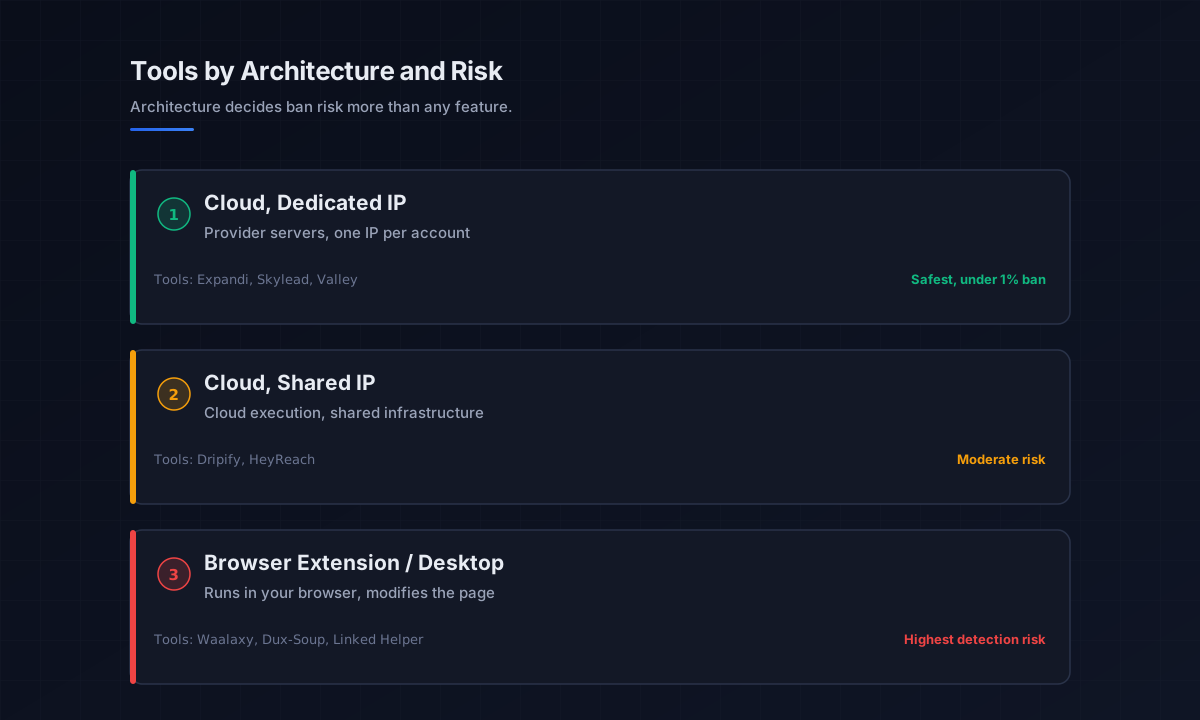
Why architecture decides everything
Before any feature comparison, understand the three architectures, because they determine ban risk more than any other factor. The teams we work with that lose accounts almost always lose them to the wrong architecture, not the wrong message.
Cloud-based with dedicated IPs
These run on the provider’s servers with a dedicated residential IP per account, so the automation looks like a single consistent user from a stable location, and the tool keeps working when your laptop is closed. This is the safest category, with the lowest reported restriction rates, and it is where high-value professional profiles belong. The cost is higher, but for cloud linkedin automation it buys the isolation that protects the account.
Cloud-based with shared IPs
These also run in the cloud and survive a closed laptop, but multiple accounts share IP infrastructure, which raises detection risk because LinkedIn can correlate patterns across accounts on the same address. They sit in the middle on both price and safety, adequate for moderate volume, riskier as you scale.
Browser extensions and desktop apps
These run in your own browser or on your machine, often modifying the LinkedIn page directly, which creates the highest detection surface of all. Marketed sometimes as a simple LinkedIn bot, they are the cheapest option and the most fragile, since they need your browser open and present the clearest automation signature to LinkedIn. For any account you cannot afford to lose, this is the category to avoid.
The leading LinkedIn automation tools by use case
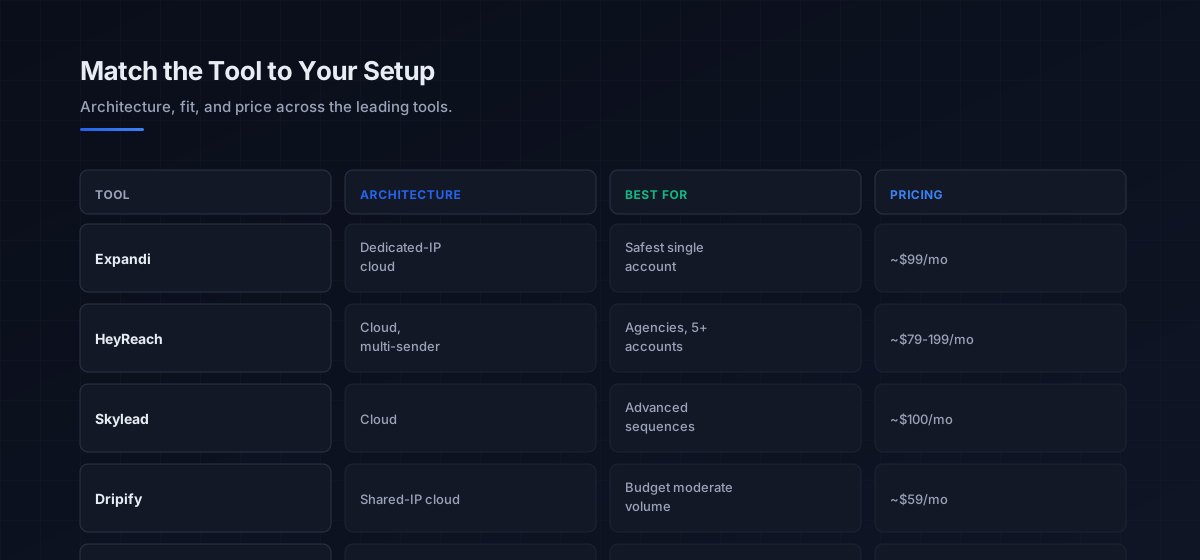
With architecture as the frame, here are the tools teams actually reach for, grouped by who they fit. Pricing is current for 2026 and noted where it shapes the decision.
For the safest single-account outreach, Expandi leads, running around 99 dollars a month with a dedicated residential IP per account, automatic pause on LinkedIn warnings, gradual auto warm-up that ramps daily actions over one to two weeks, and a reported sub-1-percent ban rate. It is the default for high-value profiles and supports multichannel sequences combining LinkedIn and email. Skylead is the comparable cloud option with the most advanced conditional sequence logic.
For agencies running many accounts, HeyReach is the strongest pick, built around multi-sender rotation that distributes outreach across profiles to raise effective capacity while lowering per-account risk, with agency-friendly economics (around 79 dollars for up to 3 senders, 199 for unlimited) that beat per-seat pricing past five accounts. For budget-conscious solo users, Dripify offers cloud execution with daily limits at roughly 59 dollars, cheaper than Expandi but on shared IPs with no dedicated isolation, while Waalaxy provides a free tier and low-cost plans suited to low volume. These linkedin outreach tools all execute well; they differ mainly in how much account protection the price buys.
Outreach automation vs content automation
A critical distinction most buyers miss: do not use the same tool for outreach and for content. Outreach automation, the connection requests, messages, and sequences these tools send, carries inherent ban risk because it acts on your behalf in ways LinkedIn restricts. Content automation, scheduling posts and carousels, is different: the safest content tools use LinkedIn’s official API and therefore avoid the restriction risk entirely.
Mixing them is a mistake. An outreach tool scheduling your content adds no safety benefit and a content tool cannot safely run outreach. Keep the two functions on separate tools, an API-based scheduler for posting and a dedicated, safe-architecture automation tool for outreach, so the ban risk of one never touches the other. This matters more in 2026 because the content-warming layer from the LinkedIn outreach pillar runs best on compliant API tools while the outreach runs on dedicated-IP automation.
How LinkedIn automation fits the data and outreach stack
A linkedin automation software subscription executes outreach but does not, on its own, find the right people or supply their contact data. It needs feeding. Targeting comes from LinkedIn Sales Navigator, which builds the signal-based lists, and because Sales Navigator withholds email export, an enrichment layer attaches verified contact data so the automation can run a true multichannel cadence rather than LinkedIn-only.
This is where the tools connect to the wider motion. Multichannel platforms like Expandi and La Growth Machine combine LinkedIn and email natively, while a best-of-breed route pairs a LinkedIn automation tool with a separate email sequencer kept healthy per email deliverability practice. Broader data platforms such as Apollo supply contact data and sequencing in one place, and an email sequencer like Smartlead coordinates the email half of the cadence the automation tool runs alongside LinkedIn. The principle from the sales prospecting guide holds: the automation tool is the execution layer, and it is only as good as the targeting and data feeding it.
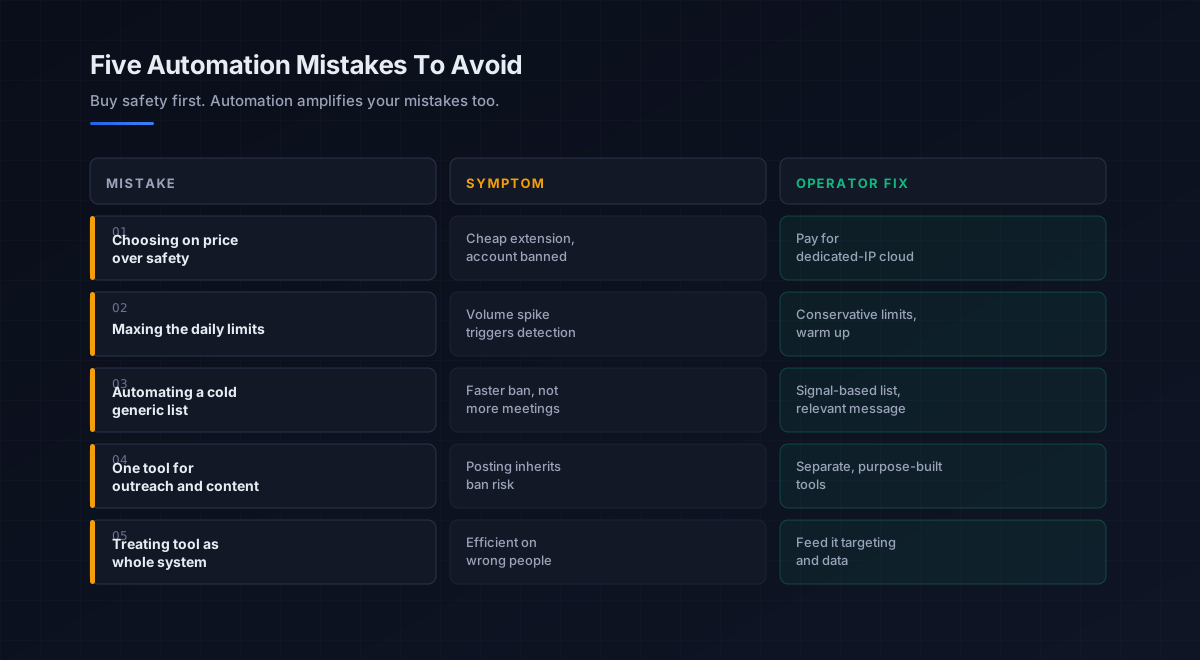
Five mistakes teams make with LinkedIn automation tools
What we see most often is the same handful of errors that get accounts restricted and campaigns wasted.
-
Choosing on price over architecture. The cheapest extensions carry the highest ban risk. For any account you value, pay for dedicated-IP cloud architecture instead.
-
Maxing the daily limits. Aggressive volume spikes trigger LinkedIn’s detection. Use conservative limits and a gradual warm-up, especially on new or newly-automated accounts.
-
Automating a cold, generic list. Automation amplifies bad targeting into a faster ban. Point it at a tight, signal-based list with a relevant message.
-
Using one tool for outreach and content. Outreach tools carry ban risk that API-based content tools avoid. Keep posting and outreach on separate, purpose-built tools.
-
Treating the tool as the whole system. Automation executes but does not target or enrich. Feed it Sales Navigator lists and verified contact data, or it runs efficiently on the wrong people.
An eight-step framework for choosing LinkedIn automation tools
This is the order we work through with the teams we work with when they add automation. Run it before buying anything.
- Sort by architecture first. Dedicated-IP cloud for any valued account, shared-IP cloud for moderate budget volume, avoid extensions for important profiles.
- Match the tool to account count. Single or few accounts favor Expandi or Skylead; five-plus accounts favor HeyReach’s rotation economics.
- Decide LinkedIn-only or multichannel. Pick a native LinkedIn-plus-email tool, or plan to pair a LinkedIn tool with an email sequencer.
- Insist on auto warm-up. Confirm the tool ramps daily actions gradually, since spike detection causes most restrictions.
- Set conservative limits. Respect the platform’s reputation-based limits and resist maxing volume, especially early.
- Separate content from outreach. Run posting on an API-based scheduler and outreach on the safe-architecture tool, never the same tool.
- Feed it good targeting and data. Supply Sales Navigator lists and verified emails so the automation runs on the right people.
- Judge on meetings and account health. Measure booked meetings and restriction-free uptime together, because a banned account zeroes the ROI.
How LinkedIn automation fits the broader stack
Automation is the execution layer of the LinkedIn channel, which is one channel of outbound. Each connects to a deeper guide.
- The LinkedIn playbook. Messaging, cadence, and reputation limits in the LinkedIn outreach pillar.
- Targeting. Building the signal-based lists, in LinkedIn Sales Navigator.
- Prospecting and data. Enrichment that fills the email gap, in best AI tools for sales prospecting.
- Data enrichment. Turning lists into verified contact data, in data enrichment tools.
- Strategy. The motion the outreach serves, in outbound sales.
- The phone channel. Stacking calls with LinkedIn, in the cold calling pillar.
- The wider AI stack. AI tools that assist outreach, in best AI sales tools.
- Email coordination. Stacking LinkedIn with email, on email deliverability and sender reputation.
That is the map. Sales Navigator finds the right people, enrichment makes them reachable off-platform, the automation tool executes the cadence safely, and the outreach playbook supplies the relevance that keeps the whole thing off LinkedIn’s restriction radar.
Frequently asked questions
What are the best LinkedIn automation tools in 2026?
Are LinkedIn automation tools safe to use?
Can LinkedIn detect automation tools?
How much do LinkedIn automation tools cost?
What is the difference between cloud and browser-extension LinkedIn tools?
Should I use the same tool for LinkedIn outreach and content?
Do LinkedIn automation tools replace Sales Navigator?
The bottom line
The best LinkedIn automation tools in 2026 are the ones whose architecture protects your account, not the ones with the longest feature list. Dedicated-IP cloud platforms like Expandi lead on safety for single accounts, HeyReach wins for agencies through multi-account rotation, and budget cloud tools like Dripify suit moderate volume, while browser extensions carry the ban risk that wipes out any short-term gain. Sort by architecture, match to your account count, separate content from outreach, and feed the tool good targeting and data.
If you take one rule from this guide, make it this: automation amplifies whatever you point it at. Aim it at a tight, signal-based list with a relevant message and conservative limits on a safe-architecture tool, and it compounds good outreach. Aim it at a cold list with a generic blast and maxed limits, and it just gets you banned faster. Buy safety first, respect the platform’s limits, and let the tool execute the repetitive work while you keep the targeting and relevance human.
Get the operator playbook in your inbox. The Outbound Game publishes one operator-grade breakdown a week on B2B outbound sales, tactics, tooling, and ops. No fluff, no vendor talking points. Subscribe and get the next one when it ships.
More on LinkedIn Outreach
Dripify vs Expandi in 2026: A Full Operator Verdict
Dripify vs Expandi in 2026, compared by job. The affordable all-rounder vs the premium safety play: real pricing, the ban risk, and which one fits.
LinkedIn Sales Navigator vs Premium in 2026, Compared
LinkedIn Sales Navigator vs Premium in 2026, compared by job. The prospecting workspace vs the networking upgrade: real pricing and which one fits.
LinkedIn Outreach in 2026: A B2B Operator Playbook
LinkedIn outreach in 2026 wins on relevance, not volume. An operator playbook on connection rates, InMail, signals, cadence, and the metrics.