LinkedIn Sales Navigator in 2026: Plans and Pricing
LinkedIn Sales Navigator in 2026, compared plan by plan. An operator guide to Core vs Advanced pricing, features, the data gap, and whether it is worth it.
LinkedIn Sales Navigator is the targeting engine behind serious B2B prospecting on the platform, and in 2026 the buying decision is simpler than the three-tier Sales Navigator pricing page makes it look. There are three plans, Core, Advanced, and Advanced Plus, and for most sellers the honest answer is Core, paired with an enrichment tool to fill the one gap LinkedIn deliberately leaves open. Around 700,000 sales professionals use it, and 71 percent of all sales pros and 90 percent of top performers rely on social-selling tools like it, because it turns LinkedIn’s 1 billion-plus member network into a searchable, signal-driven prospecting database.
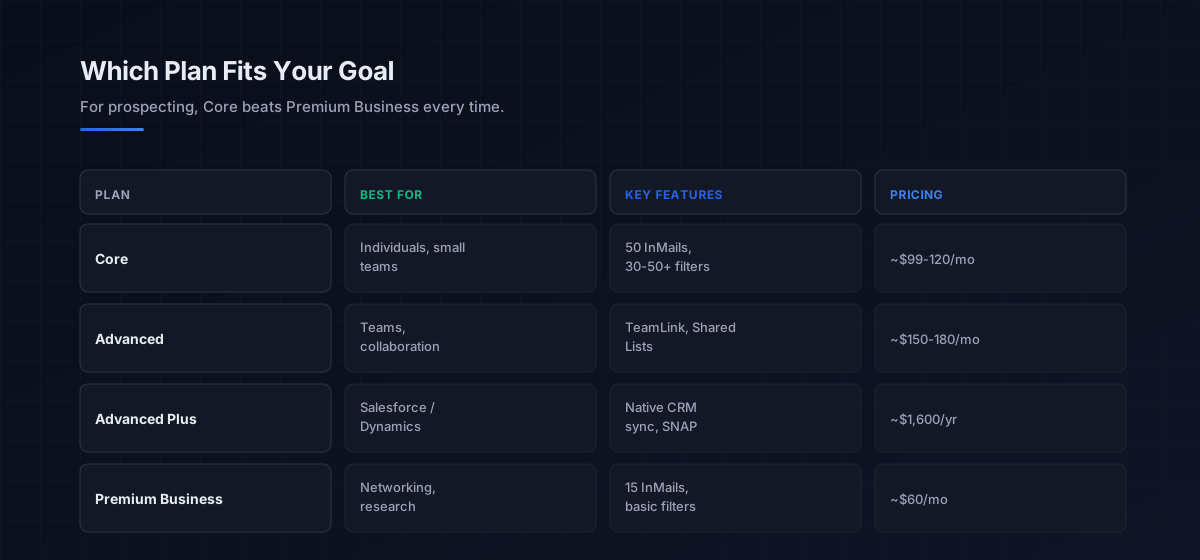
The number that frames every decision: Core runs 99.99 to 119.99 dollars a month depending on region, dropping to roughly 79.99 to 89.99 annually, and it delivers 50 InMail credits, 30 to 50-plus advanced search filters, the ability to save up to 10,000 leads, and real-time alerts on job changes, posts, and news. The single most important thing to understand before paying, though, is what it does not include: Sales Navigator does not give you email addresses or let you export leads. That gap, and how you fill it, decides whether the subscription actually produces pipeline.
This is the commercial companion to the LinkedIn outreach pillar, which covers the messaging and cadence that turn these leads into replies. Sales Navigator is the find-and-target layer; the outreach playbook is the convert layer, and the sales prospecting guide covers the data tooling that bridges them.
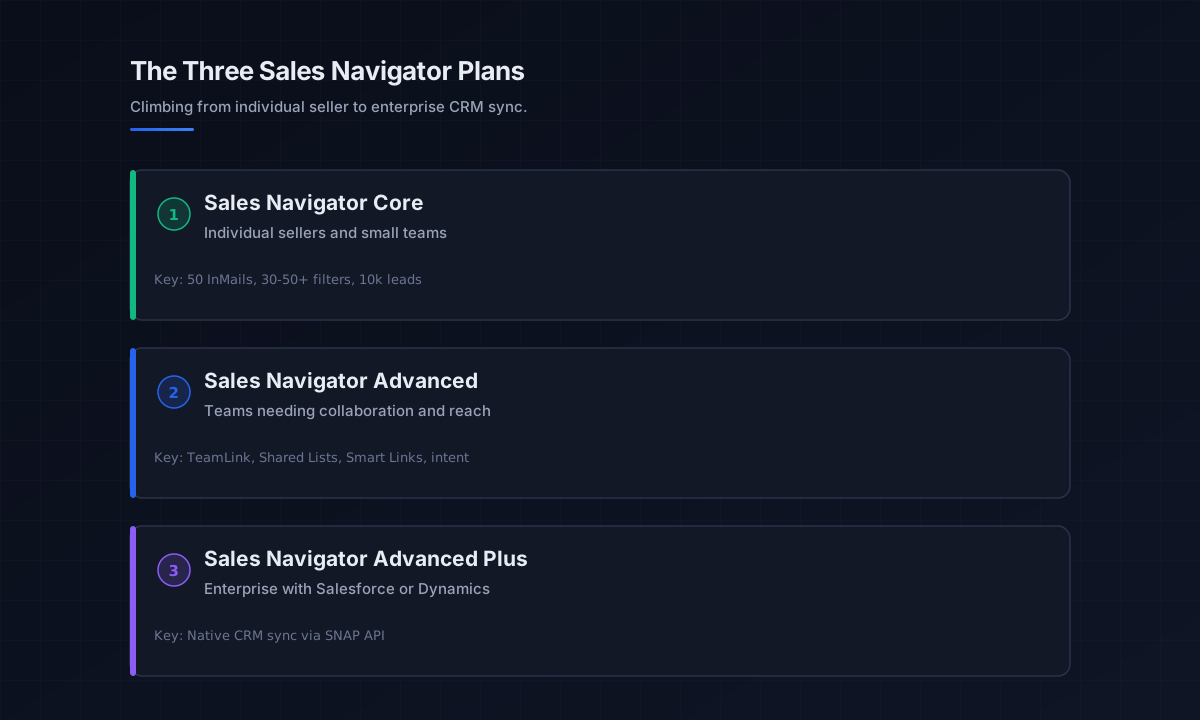
The three LinkedIn Sales Navigator plans
The plans climb from individual seller to enterprise CRM integration. Here is what each actually delivers in 2026, with pricing verified against current plan pages.
Sales Navigator Core
Sales Navigator Core is the entry plan for individual sellers, and the one most people should buy. At 99.99 to 119.99 dollars a month (around 79.99 to 89.99 annually), it includes advanced lead and company search with 30 to 50-plus filters spanning function, seniority, location, and industry; lead recommendations based on your activity; saved lists holding up to 10,000 leads; real-time alerts when saved leads change jobs, post, or appear in the news; and 50 InMail credits a month. It is the core prospecting infrastructure, and for solo sellers and small teams it covers the job.
Sales Navigator Advanced
Sales Navigator Advanced adds team-oriented features on top of everything in Core, at 149.99 to 179.99 dollars a month (around 139.99 annually). The additions are collaboration and reach tools: TeamLink to surface warm introductions through your colleagues’ networks, Shared Lists, CSV account uploads, Smart Links for trackable content sharing with engagement insight, Buyer Intent signals, and enterprise basics like SSO. It fits sales teams that need to coordinate outreach and tap each other’s networks, rather than individual sellers.
Sales Navigator Advanced Plus
Advanced Plus is the enterprise tier, starting around 1,600 dollars per seat per year with custom pricing. Its defining feature is native CRM sync, and it exclusively supports Salesforce and Microsoft Dynamics 365 through the SNAP API. The honest guidance, echoed across reviews, is that Advanced Plus is only worth exploring if your organization runs one of those two CRMs and genuinely needs the bi-directional sync. Otherwise the jump in cost buys little the lower tiers do not.
Sales Navigator vs Premium Business: the easy call
The most common confusion is between Sales Navigator and LinkedIn Premium Business, and for prospecting it is not close. Premium Business runs 59.99 dollars a month and gives you 15 InMail credits, company insights, and unlimited browsing, fine for networking and market research, weak for outbound. The sales navigator vs premium comparison comes down to intent: if your goal is lead generation, choose Sales Navigator Core over Premium Business every time.
For roughly 40 to 60 dollars more a month, Core gives you 50 InMail credits instead of 15, 30 to 50-plus advanced lead filters instead of basic enhanced ones, the ability to save 10,000 leads with real-time alerts, lead recommendations, and CRM integration. Premium Business wins in exactly one scenario: you want LinkedIn Learning and company insights without any sales-specific features. For anyone with an outbound goal, that extra spend is among the easiest yes decisions in the whole linkedin premium lineup.
What changed in Sales Navigator for 2026
Three shifts matter this year. First, Sales Navigator Core absorbed Smart Links and basic intent signals that previously required Advanced, narrowing the gap between the two tiers and making Core a stronger standalone value. Second, AI writing features are now bundled into the Premium Career and Premium Business tiers at no extra charge, which is worth noting because it changes how the cheaper plans compare, though it does not close the prospecting gap with Sales Navigator. Third, search result caps remain a real constraint: you can view up to 2,500 lead results across 100 pages, or 1,000 account results across 40 pages, so very broad searches need tightening into segments rather than one giant list.
There is also a question that comes up constantly in 2026: can you connect Sales Navigator to AI assistants through an MCP server? The short answer is no. LinkedIn does not offer an official MCP server for Sales Navigator, and its SNAP API, available only on Advanced Plus, is restricted to approved CRM partners. Anyone promising deep automated AI access to Sales Navigator data is working around LinkedIn’s terms, which carries account risk on a platform that polices automation aggressively, a point the LinkedIn outreach pillar covers in the context of reputation-based limits.
The data gap, and how to fill it
This is the part that decides ROI. Sales Navigator shows you exactly who to target but not how to reach them off-platform, because it provides neither verified email addresses nor a lead-export button. For a LinkedIn-only motion that lives on InMail and connection requests, that is fine. For any multichannel motion that stacks LinkedIn with email and phone, it is a hard blocker.
The fix is an enrichment layer. Tools built for this, browser extensions and bulk exporters, take your filtered Sales Navigator lists and attach verified emails, then export to CSV or your CRM, letting you skip InMail credits entirely for prospects you would rather email, where keeping that email channel healthy is a matter of sender reputation. Broader data platforms like Apollo combine their own contact database with sequencing so the targeting and the outreach live in one place, and pairing the exported list with a sequencer such as Smartlead turns Sales Navigator’s targeting into a running multichannel cadence. The principle from the broader sales prospecting guide applies directly: targeting quality and contact-data quality are two different layers, and Sales Navigator only owns the first.
Is LinkedIn Sales Navigator worth it?
For anyone whose pipeline depends on LinkedIn, the LinkedIn Sales Navigator subscription is worth it, with one condition. The targeting and signal capabilities are genuinely best-in-class, LinkedIn’s own data ties Sales Navigator use to higher win rates and larger pipeline, and for high-value B2B the cost is trivial against a single closed deal. The condition is that you pair it with an enrichment layer so the leads can actually enter your outreach, otherwise you are paying premium prices for a search tool whose output stays trapped on the platform.
The plan choice follows directly: solo sellers and small teams take Core, teams needing collaboration and warm-intro reach take Advanced, and only Salesforce or Dynamics shops needing native CRM sync should look at Advanced Plus. Annual billing saves roughly 17 to 25 percent, so commit annually once you know the tool fits. Judge the subscription not on its feature list but on whether it is producing booked meetings, which means judging the targeting-plus-data system as a whole, not Sales Navigator alone.
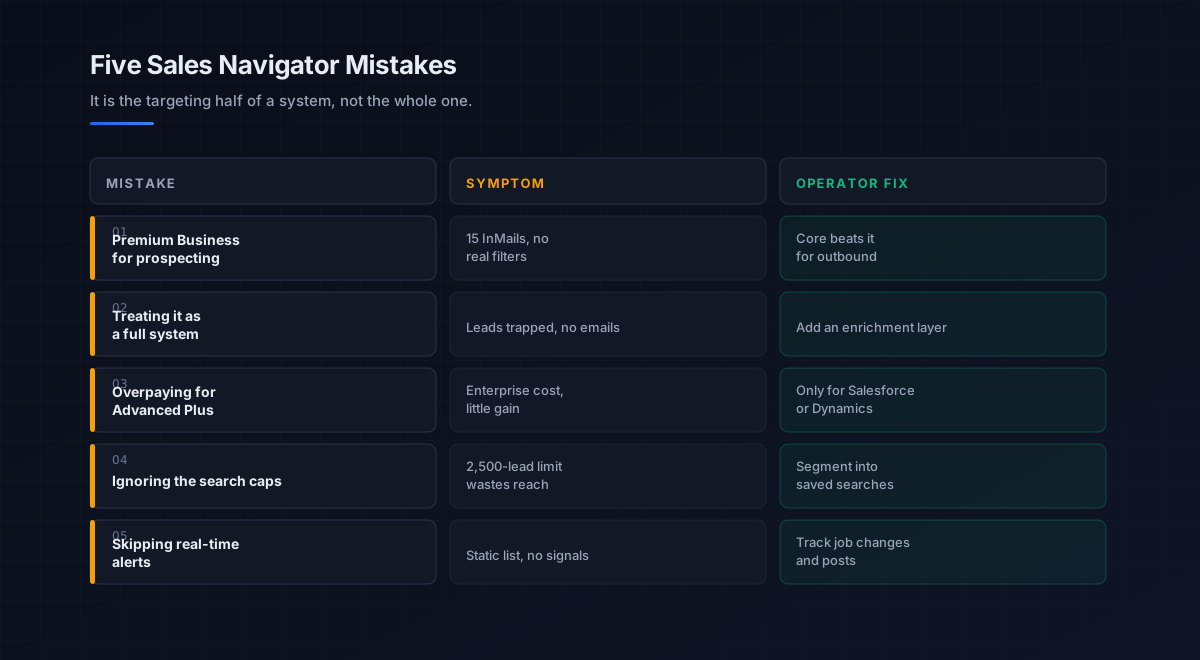
Five mistakes teams make with Sales Navigator
What we see most often is the same handful of errors that waste the subscription.
-
Buying Premium Business for prospecting. It has 15 InMails and no real lead filters. For outbound, Core beats it every time for a small extra cost.
-
Treating it as a complete system. Sales Navigator finds people but withholds emails and export. Without an enrichment layer, the leads stay trapped on the platform.
-
Overpaying for Advanced Plus. Its defining value is Salesforce and Dynamics sync. Without one of those CRMs, the enterprise tier rarely justifies its cost.
-
Ignoring the search caps. With 2,500-lead and 1,000-account view limits, one giant search wastes reach. The fix is tight, segmented saved searches.
-
Skipping the real-time alerts. The job-change, post, and news alerts are the signal engine. Ignoring them turns a dynamic prospecting tool into a static list.
An eight-step framework for using Sales Navigator well
This is the order we set up Sales Navigator in, for our own prospecting and for the teams we work with. Run it top to bottom.
- Pick the right plan. Core for individuals and small teams, Advanced for collaboration, Advanced Plus only for Salesforce or Dynamics sync.
- Define a tight ICP in filters. Use function, seniority, industry, and geography to build a precise audience, not a broad one.
- Segment around the search caps. Break large audiences into saved searches under the 2,500-lead limit so you see the whole segment.
- Turn on the signals. Track job changes, posts, and news on saved leads. These triggers are the relevance engine for outreach.
- Add an enrichment layer. Attach verified emails and export filtered lists so prospects can enter email and phone sequences.
- Connect to outreach. Feed the enriched list into a multichannel cadence, coordinating InMail, email, and phone.
- Use InMail as precision. Spend the 50 credits on prospects you cannot reach by email, not as a volume channel.
- Judge on meetings, not features. Measure whether the targeting-plus-data system books meetings, and commit annually once it does.
How Sales Navigator fits the broader stack
Sales Navigator is the targeting layer of the LinkedIn channel, which is one channel of outbound. Each connects to a deeper guide.
- The LinkedIn playbook. Messaging, cadence, and limits in the LinkedIn outreach pillar.
- Prospecting and data. The enrichment tools that fill the email gap, in best AI tools for sales prospecting.
- Data enrichment. Turning targeted lists into verified contact data, in data enrichment tools.
- Strategy. The motion the prospecting serves, in outbound sales.
- The phone channel. Stacking calls with LinkedIn, in the cold calling pillar.
- The wider AI stack. AI tools that assist prospecting, in best AI sales tools.
- AI agents. Where targeting meets automation, in the AI SDR pillar.
- Email coordination. Stacking LinkedIn with email, on email deliverability and sender reputation.
That is the map. Sales Navigator finds and segments the right people, the enrichment layer attaches verified contact data, and the outreach playbook turns that targeted, reachable list into booked meetings across LinkedIn, email, and phone.
Frequently asked questions
How much does LinkedIn Sales Navigator cost in 2026?
Which Sales Navigator plan should I buy?
Is Sales Navigator worth it over LinkedIn Premium Business?
Does Sales Navigator include email addresses?
Can you export leads from Sales Navigator?
Can I connect Sales Navigator to an AI assistant or MCP server?
What changed in Sales Navigator for 2026?
The bottom line
LinkedIn Sales Navigator in 2026 is the best targeting engine for B2B prospecting on the platform, and the plan decision is straightforward: Core for individuals and small teams, Advanced for collaboration, Advanced Plus only for Salesforce or Dynamics CRM sync. For lead generation it beats Premium Business every time, and the 2026 changes made Core a stronger standalone value by absorbing features that used to require Advanced.
If you take one rule from this guide, make it this: Sales Navigator is the targeting half of a system, not the whole one. It finds exactly the right people and then deliberately withholds their emails and the export button. Pair it with an enrichment layer that adds verified contact data and gets your lists off the platform, and the subscription becomes real multichannel pipeline. Skip that layer and you are paying premium prices for a search tool whose output stays locked inside LinkedIn.
Get the operator playbook in your inbox. The Outbound Game publishes one operator-grade breakdown a week on B2B outbound sales, tactics, tooling, and ops. No fluff, no vendor talking points. Subscribe and get the next one when it ships.
More on LinkedIn Outreach
Dripify vs Expandi in 2026: A Full Operator Verdict
Dripify vs Expandi in 2026, compared by job. The affordable all-rounder vs the premium safety play: real pricing, the ban risk, and which one fits.
LinkedIn Sales Navigator vs Premium in 2026, Compared
LinkedIn Sales Navigator vs Premium in 2026, compared by job. The prospecting workspace vs the networking upgrade: real pricing and which one fits.
The Best LinkedIn Automation Tools in 2026, Ranked
The best LinkedIn automation tools in 2026, ranked by safety not features. An operator guide to cloud vs extension architecture and ban risk.