LinkedIn Sales Navigator vs Premium in 2026, Compared
LinkedIn Sales Navigator vs Premium in 2026, compared by job. The prospecting workspace vs the networking upgrade: real pricing and which one fits.
The honest answer to LinkedIn Sales Navigator vs Premium in 2026 is that they are not two tiers of the same product; they are two different products that buyers constantly confuse. LinkedIn Premium is a general-purpose upgrade to your normal account, built for personal branding, networking, job searching, and learning. Sales Navigator is a separate, dedicated prospecting workspace that runs alongside LinkedIn but operates independently, with advanced search, lead lists, buyer intent, and the tools a B2B seller needs to find and track decision-makers at scale. Choosing the wrong one means either overpaying for sales features you will never touch or lacking the tools to prospect effectively, so the decision starts with what you are actually trying to do.
Get that framing right and the choice almost makes itself. If you are doing active B2B prospecting, building pipeline, and reaching out to people outside your network, Sales Navigator wins on every metric that matters for sales. If you want more visibility into who viewed your profile, expanded networking, and LinkedIn Learning, Premium Business is sufficient and roughly half the price. As one analyst put it, Premium is enhanced search while Sales Navigator is systematic prospecting, and for teams doing serious outbound that distinction is worth the price gap. This guide compares them the way an operator actually decides: by job and prospecting volume, not by feature list.
This is a head-to-head inside the linkedin outreach cluster, where the linkedin sales navigator deep-dive covers the platform in full and linkedin automation tools covers scaling outreach. Whichever tier you pick is a prospect-finder that feeds your cold email and sales cadence and lands contacts in your CRM software.
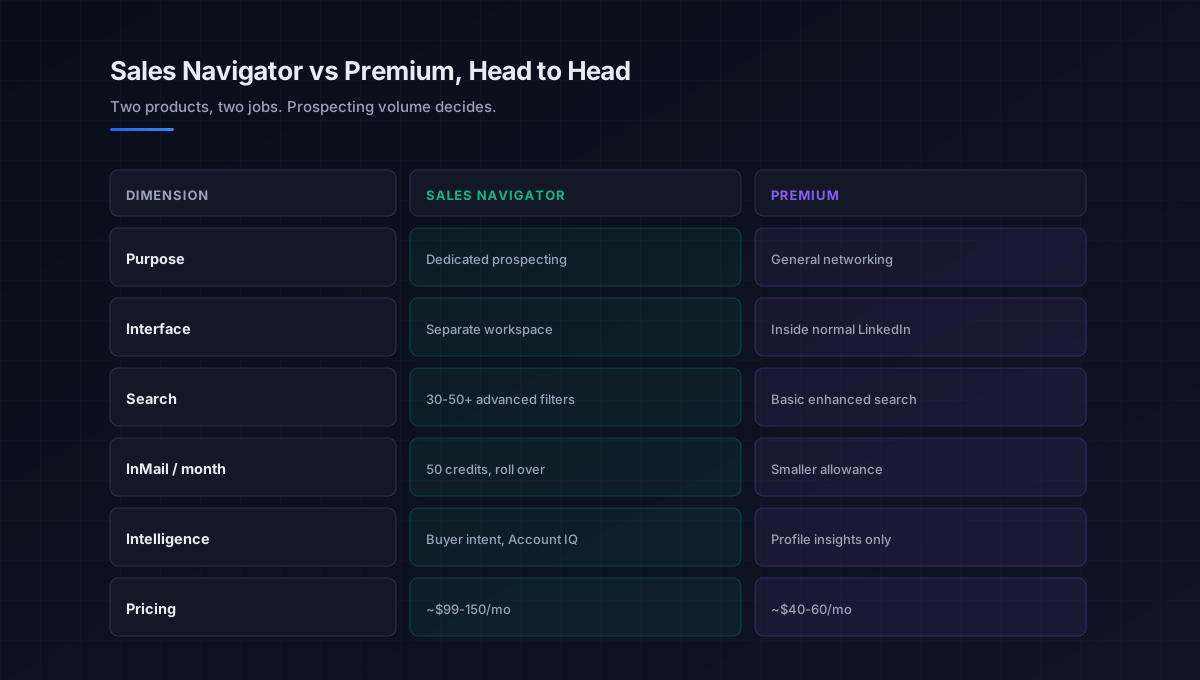
Where the two genuinely differ
They share a parent platform, but the experience and the purpose diverge sharply, so focus on the dimensions that actually drive a sales decision. This is what should settle the choice.
Purpose and interface
Premium Business lives inside your regular LinkedIn account, enhancing the normal experience with profile insights, unlimited browsing, and business data. Sales Navigator is a completely separate workspace; when you log into it you leave the standard LinkedIn experience entirely and work inside an interface designed for finding, tracking, and reaching decision-makers. That separation is intentional, it keeps prospecting organized and distinct from personal networking, and it is the single biggest practical difference.
Search
This is the differentiator most sellers feel first. With Premium, search is basic, an enhanced version of the normal LinkedIn search. With Sales Navigator, you get 30 to 50-plus advanced search filters, so specific that you can build a query targeting an exact title, company size, geography, tenure, and seniority. For systematic linkedin prospecting, that filtering depth is the line between guessing and precision, and it is why Sales Navigator is the accepted industry standard for B2B sellers.
InMail and intelligence
Sales Navigator provides 50 InMail credits a month (unused credits roll over up to 90 days), against Premium Business’s smaller allowance, more than three times the volume for reaching people outside your network. It also adds lead and account lists, real-time alerts when prospects change jobs, buyer intent signals, and AI-powered account insights (Account IQ), none of which Premium offers. These are the systematic-prospecting tools that justify the gap for an active seller.
Pricing
The economics are clear. Sales Navigator pricing starts higher: Premium Business runs about 40 to 60 dollars a month, while Sales Navigator Core sits around 99 to 150 dollars a month (roughly 1,200 to 1,600 dollars a year), with Advanced and Advanced Plus tiers adding team features and CRM integration above that. The roughly 40 to 60 dollar monthly gap looks significant until you weigh it against the feature difference: a rep paying around 1,200 dollars a year needs to close just one decent deal from it to justify the cost.
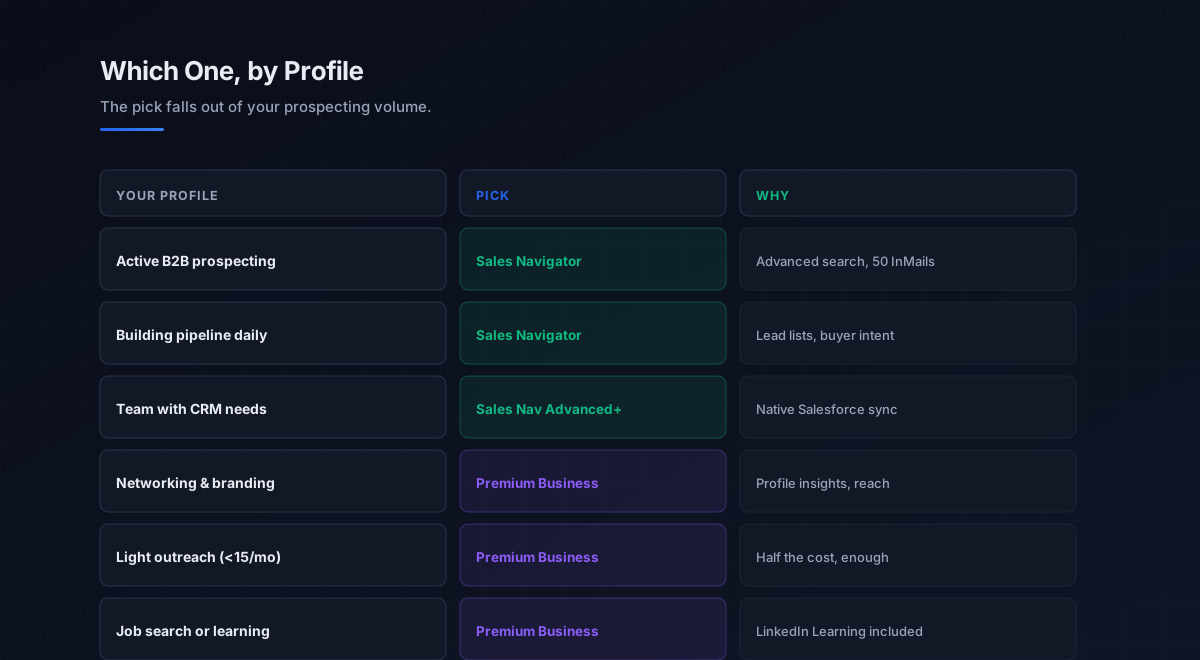
The decision in one question
Because they fit different jobs, the cleanest way through the sales navigator vs premium choice is a single question: how often do you actively prospect. Everything else follows from the answer.
If you prospect regularly, building pipeline, running structured outreach, reaching people outside your network, choose Sales Navigator. The advanced search, lead lists, InMail volume, and buyer intent are exactly what active selling needs, and the roughly 1,200 dollar annual cost is trivial against the pipeline it builds. If you do light outreach (fewer than fifteen meaningful cold messages a month), build a personal brand, generate business through warm intros, or want LinkedIn Learning, choose Premium Business. It is sufficient for networking and roughly half the cost, and paying for Sales Navigator’s prospecting machinery you will not use is simply waste.
There is no real third path here, since these are distinct products rather than points on a spectrum. The one nuance worth noting: Sales Navigator Core and Advanced do not include native CRM integration (only Advanced Plus does), so an individual seller on Core typically exports leads and pushes them into a CRM separately. The deeper platform mechanics live in the linkedin sales navigator guide, and scaling the outreach itself in linkedin automation tools.
The limitation both share
If you choose Sales Navigator for prospecting, the most important thing to understand is what it does not do, because this is where most LinkedIn outreach quietly fails. Sales Navigator is the best tool on the market for finding and identifying the right buyers, but it is not built to reach them. LinkedIn profiles rarely display a direct business email or a mobile number, InMail credits are capped, and InMail response rates typically sit between ten and fifteen percent. So even the best prospecting workspace leaves you with a list of identified people you cannot yet contact at scale.
That is why Sales Navigator sits at the front of a motion, not the whole of it. The identified leads need verified contact details from the b2b data providers and data enrichment tools layers to turn a name into a reachable email, and then the outreach runs through cold email software and the sales cadence, landing only if the domain has clean email deliverability and sender reputation. LinkedIn itself documents its tools as prospecting aids rather than outreach engines, which you can verify at linkedin.com. The activity then logs to your CRM software. Sales Navigator finds the right people; the rest of the stack is what reaches them.
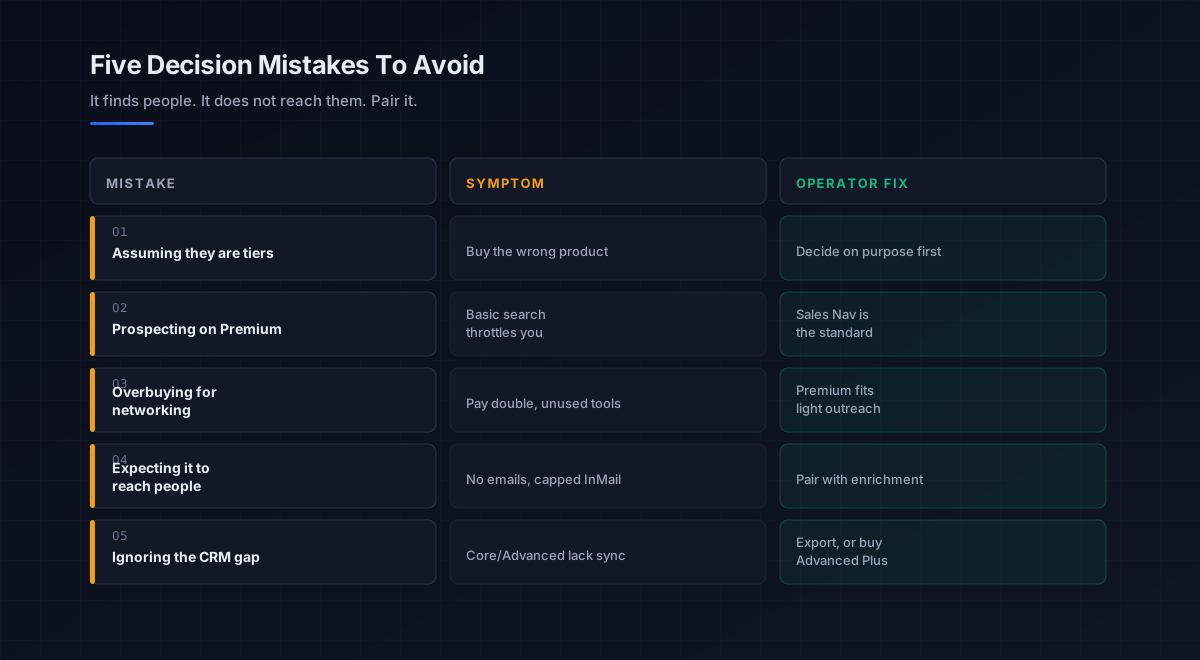
Five mistakes teams make choosing between them
What we see most often is the same handful of errors in this specific decision.
-
Assuming they are tiers of one product. They are distinct products for distinct jobs. Decide on purpose, prospecting or networking, before comparing price.
-
Prospecting on Premium. Premium’s basic search and limited InMails throttle systematic outbound. For active prospecting, Sales Navigator is the standard, not a luxury.
-
Overbuying Sales Navigator for networking. If you do light outreach and mostly network, you are paying double for prospecting machinery you will not use.
-
Expecting it to reach people. Neither tool surfaces verified emails or sends at scale. Pair Sales Navigator with enrichment and a deliverable domain.
-
Ignoring the CRM gap. Core and Advanced lack native CRM sync. Plan to export leads, or budget for Advanced Plus if integration is essential.
An eight-step framework for the decision
This is the order we work through with the teams we work with on this specific choice. Run it before subscribing.
- Measure your prospecting volume. Count the meaningful cold messages you send a month, since that is the deciding number.
- Name the job. Active pipeline building points to Sales Navigator; networking, branding, and learning point to Premium Business.
- Match the tier. Light outreach to Premium, systematic prospecting to Sales Navigator Core, teams with CRM needs to Advanced or Advanced Plus.
- Model the real cost. Premium around 40 to 60 dollars a month versus Sales Navigator around 99 to 150, against the pipeline each enables.
- Plan for contact data. Decide how you will turn identified leads into verified emails, since neither tool provides them.
- Plan for outreach. Confirm a deliverable domain and a cadence, since InMail alone caps out fast.
- Handle the CRM gap. Set up lead export, or budget Advanced Plus if native sync is required.
- Trial, then commit. Use a free trial to confirm the search depth and workflow fit your motion before paying annually.
How this choice fits the broader stack
Whichever tier you pick, it is the front end of a LinkedIn-led outbound motion. Each connected layer has a deeper guide.
- The pillar. The full LinkedIn outreach motion, in linkedin outreach.
- The platform. Sales Navigator in depth, in linkedin sales navigator.
- Scaling outreach. Automating LinkedIn touches, in linkedin automation tools.
- The data layer. Turning identified leads into verified contacts, in b2b data providers and data enrichment tools.
- The email channel. Where outreach scales beyond InMail, in cold email software and the cold email pillar.
- The cadence. How LinkedIn and email touches sequence, in sales cadence and sales engagement platforms.
- The system of record. Where leads and activity log, in CRM software.
- Strategy. The motion LinkedIn feeds, in outbound sales.
That is the map. Sales Navigator or Premium identifies the right people, the data layer makes them reachable, deliverability earns the inbox, and the cadence runs the outreach, with the LinkedIn tier only as valuable as the motion built around it.
Frequently asked questions
What is the difference between LinkedIn Sales Navigator and Premium?
Is Sales Navigator worth it over Premium for sales?
How much do LinkedIn Premium and Sales Navigator cost in 2026?
Can I do sales prospecting with just LinkedIn Premium?
Does Sales Navigator include verified emails and phone numbers?
Does Sales Navigator integrate with my CRM?
Which LinkedIn plan is best for a founder doing light outreach?
The bottom line
LinkedIn Sales Navigator vs Premium in 2026 is not a contest of which is better, but of which job you are doing. Premium Business is the networking and branding upgrade, basic search, profile insights, LinkedIn Learning, at roughly 40 to 60 dollars a month. Sales Navigator is the dedicated prospecting workspace, advanced search, lead lists, buyer intent, and triple the InMail volume, at around 99 to 150 dollars a month, the accepted standard for any rep serious about building pipeline on LinkedIn. Answer one question, how often do you prospect, and the choice resolves itself.
If you take one rule from this comparison, make it this: match the tier to your prospecting volume, and remember that even the best one only finds people. Sales Navigator is the strongest prospect-finder on the market, but it does not surface verified emails or send at scale, so it is the front of the motion, not the whole. Pick the tier your prospecting actually justifies, then pair it with enrichment for contact data and a deliverable domain for the outreach, because finding the right buyers is only worth anything once you can reach them.
Get the operator playbook in your inbox. The Outbound Game publishes one operator-grade breakdown a week on B2B outbound sales, tactics, tooling, and ops. No fluff, no vendor talking points. Subscribe and get the next one when it ships.
More on LinkedIn Outreach
Dripify vs Expandi in 2026: A Full Operator Verdict
Dripify vs Expandi in 2026, compared by job. The affordable all-rounder vs the premium safety play: real pricing, the ban risk, and which one fits.
The Best LinkedIn Automation Tools in 2026, Ranked
The best LinkedIn automation tools in 2026, ranked by safety not features. An operator guide to cloud vs extension architecture and ban risk.
LinkedIn Outreach in 2026: A B2B Operator Playbook
LinkedIn outreach in 2026 wins on relevance, not volume. An operator playbook on connection rates, InMail, signals, cadence, and the metrics.