The Best Cold Calling Software in 2026, Compared by Use
The best cold calling software in 2026, compared by team size and use case. An operator guide to dialers, real pricing, AI features, and connect rates.
The best cold calling software in 2026 is not a single winner; it is the tool that matches your team size, dial volume, and the CRM you already live in, bought with eyes open about what you will actually pay. Every vendor puts AI on its homepage and a low number on its pricing page, and very few include either at the base price. The real cost shows up in seat minimums, dialer add-ons, AI tiers, and per-minute credits, and a tool advertised at 29 dollars routinely lands at 90 before a rep makes a call. This guide compares the strongest options by use case, with pricing verified for 2026, so you buy for your motion rather than for a homepage claim.
The operator framing that matters: a dialer is a throughput and connect-rate machine, and its value is capped by two things upstream of any feature list, the quality of your data and the health of your caller ID. Power dialers lift reps from 50 to 80 manual dials a day to 150 to 300, but only if the numbers are verified and the caller ID is not flagged “Spam Likely.” Pick the software for your lane, then judge it on connect-rate protection and CRM depth, not on the length of its feature grid.
This is the tooling layer of the cold calling pillar and the practical companion to AI cold calling, which covers the AI-specific product types in depth. Everything here assumes you have already done the sales prospecting work to feed the dialer verified numbers.
What separates good cold calling software from a phone
A generic VoIP line lets you call. Cold calling tools built for outbound do three things a phone cannot: drive high dial throughput, protect connect rates, and feed CRM data managers can forecast from. Those three capabilities, not call quality alone, are what separates real sales dialer software from a glorified phone line, and they are what you are paying for.
Dialer mode and throughput
The dialer mode sets your ceiling on volume. A power dialer calls one number at a time, advancing automatically, ideal for high-value B2B at a steady pace. A parallel or multi-line dialer calls several numbers at once and connects the rep to the first live answer, built for high-volume, low-pickup calling, the same logic that governs send volume in cold email. Sales teams using a power dialer typically reach 150 to 300 dials per rep per day against 50 to 80 with manual dialing, which is the entire economic case for the category.
Connect-rate protection
This is the feature most buyers underweight and the one that quietly decides results. Carriers flag high-frequency numbers as “Spam Likely,” which kills pickup. The strongest auto dialer software actively manages caller ID: rotating local-presence numbers, monitoring reputation, and remediating flags. PhoneBurner’s ARMOR and similar systems exist precisely because this problem is real and widespread, so connect-rate protection belongs near the top of any evaluation.
CRM integration depth
A cold call dialer that does not sync cleanly to your CRM creates the admin tax it was meant to remove. Native, bi-directional integration with real object mapping beats a Zapier workaround. If you live in Salesforce or HubSpot, native calling matters more than almost any other feature, because it is what lets managers forecast from call data instead of guessing.
The best cold calling software by team and use case
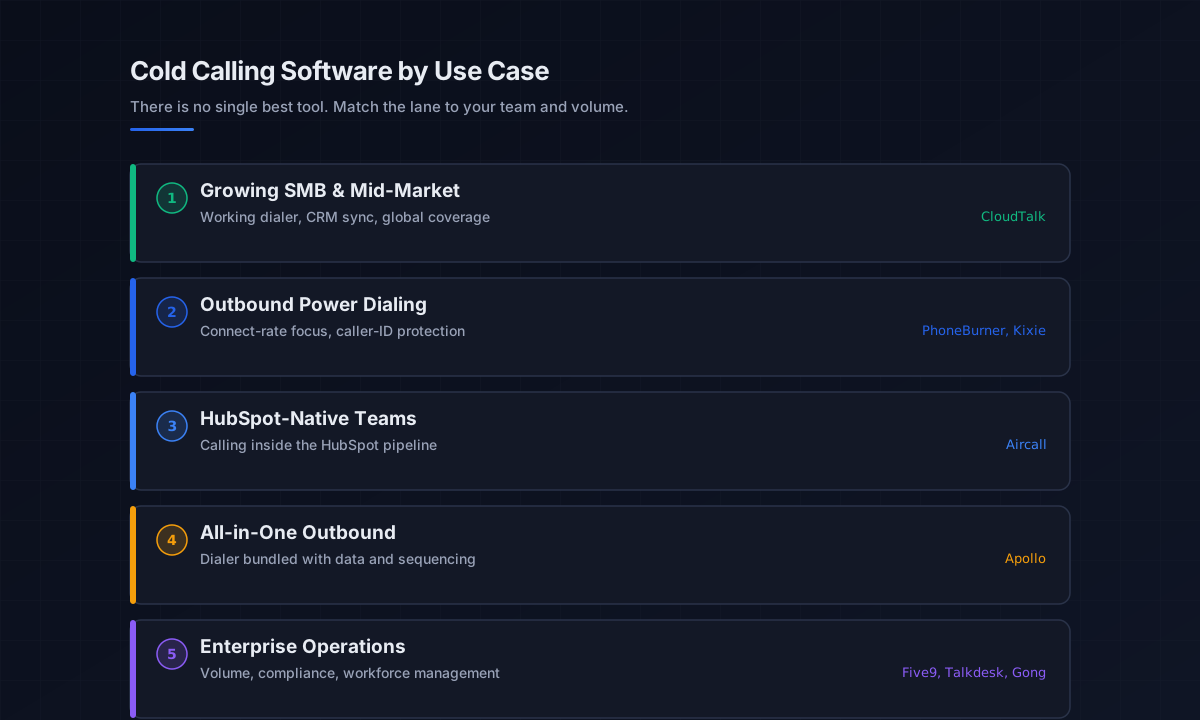
There is no single best tool, so here are the strongest options grouped by who they fit. Pricing is verified for 2026 and noted where it matters, including the add-ons that change the real number.
For growing SMB and mid-market B2B teams
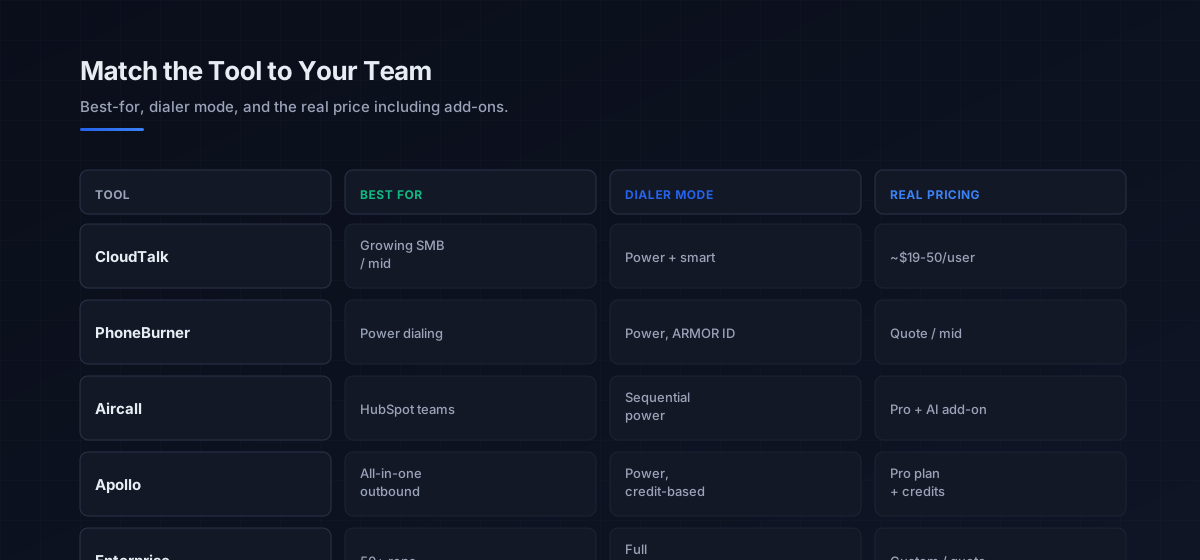
CloudTalk is the most common fit for remote SMB and growing teams that need a working dialer with strong CRM sync and global coverage. Publicly listed pricing starts around 19 to 25 dollars per user, with the power dialer, smart dialer, and Salesforce integration arriving on the Expert plan near 50 dollars per user (three-user minimum). It is the safe default when dial volume is real but not the single dominant KPI.
For outbound-focused power dialing
PhoneBurner is the specialist power dialer for North American outbound, built around connect rates. Its ARMOR system monitors caller ID reputation and rotates numbers to keep them from being flagged, and its zero-delay connection removes the awkward pause that kills the first two seconds of a call. It fits teams whose dominant KPI is dial-to-conversation throughput. Kixie is the comparable alternative with strong CRM-native triggers and built-in compliance tooling for Do Not Call alignment.
For teams living inside HubSpot
Aircall is the natural pick for B2B teams running their entire pipeline inside HubSpot, where outbound calling sits alongside inbound and account-based work. The trade-off is that its power dialer is sequential rather than parallel, with a small inter-call pause that compounds against high-volume cold calling, and its AI is a separate per-seat add-on, so a fully featured deployment costs more than the headline.
For all-in-one outbound with calling included
Apollo bundles a dialer with its data and sequencing, which is convenient if your team already lives in Apollo for prospecting and email. The US dialer sits behind the Professional plan and consumes credits per talk minute, so it suits moderate call volume alongside email rather than pure high-volume calling. For coordinating calls with email sequences in one motion, sequence-first platforms like Smartlead handle the email side while the dialer handles the phone.
For enterprise revenue teams
Large operations (50-plus reps) need enterprise infrastructure for volume, compliance, and workforce management, where Five9, Talkdesk, and RingCentral fit. Separately, Gong sits as the conversation-intelligence system of record when call data is a strategic asset feeding deal scoring and forecasting, rather than a high-volume dialing tool. Both are priced for enterprise and rarely fit an SMB budget without negotiation.
How to read cold calling software pricing
The advertised price is rarely what you pay, so price the real configuration. Start with the seat minimum, because a tool at 29 dollars that requires two users is a 58-dollar tool at the floor. Add the dialer tier, since power and parallel dialing usually sit a plan above the entry point. Add the AI layer, transcription, coaching, and call summaries are frequently a separate add-on rather than included. Add local numbers, typically 15 to 30 dollars per user per month for local presence. Then account for per-minute credits where the tool charges talk time. The sum of those, not the homepage figure, is your true cost per rep.
The cleaner way to compare the best cold calling software is by cost per booked meeting rather than cost per seat. A pricier parallel dialer that lifts connect rates can be cheaper per meeting than a budget tool that leaves reps dialing dead numbers, and that framing keeps you from optimizing the wrong number. It also reframes the data question correctly: spend on verified numbers and connect-rate protection usually returns more than spend on raw dialing features, because both attack the connect rate that sits between dials and meetings.
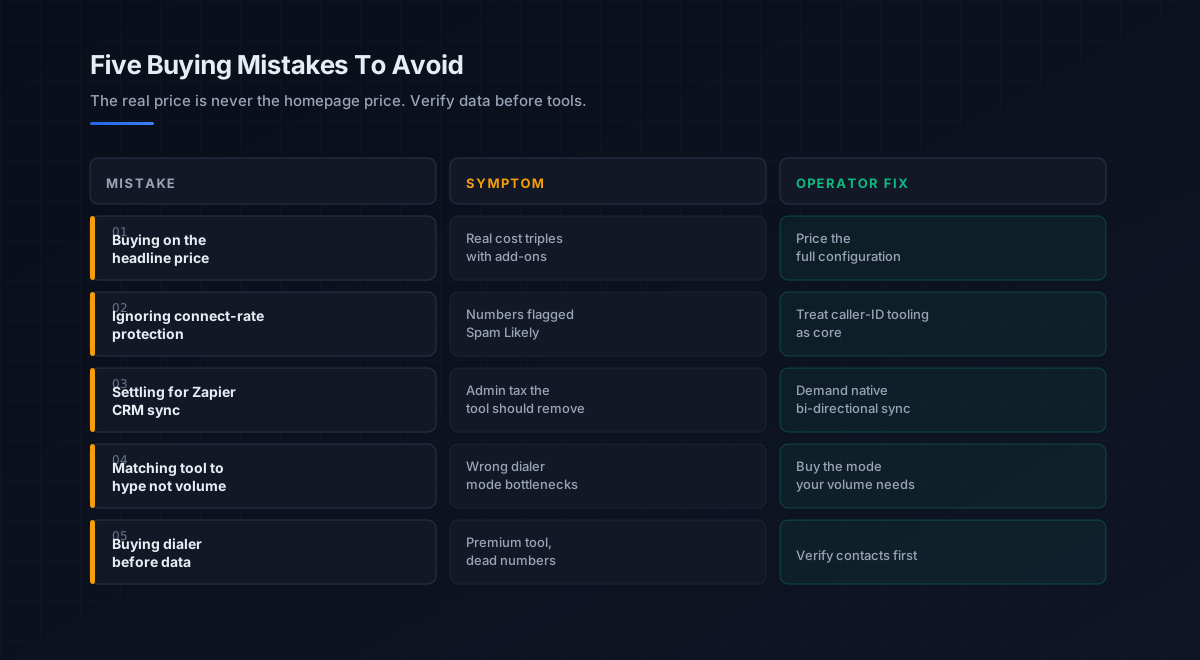
Five mistakes teams make buying cold calling software
What we see most often is the same handful of errors that turn a software purchase into wasted spend.
-
Buying on the headline price. Seat minimums, dialer tiers, AI add-ons, and per-minute credits routinely triple the real cost. Price the full configuration before signing.
-
Ignoring connect-rate protection. A dialer without active caller-ID management gets its numbers flagged “Spam Likely” and quietly loses pickup. Treat reputation tooling as a core feature, not a nice-to-have.
-
Settling for a Zapier CRM integration. A workaround sync creates the admin tax the tool should remove. Demand native, bi-directional integration with the CRM you actually use.
-
Matching the tool to hype, not volume. A parallel dialer is wasted on a low-volume high-value motion, and a sequential dialer bottlenecks a high-volume one. Buy the dialer mode your call volume requires.
-
Buying the dialer before fixing the data. The most common and most expensive error. A premium dialer pointed at unverified numbers wastes the spend. Verify contacts first; the dialer is only as good as the list.
An eight-step framework for choosing cold calling software
This is the order we work through with the teams we work with when they pick a dialer. Run it before buying anything.
- Verify the data first. Source phone-verified direct dials for a tight ICP. The dialer cannot rescue dead numbers.
- Define your dominant KPI. Dial throughput, connect rate, coaching, or CRM forecasting. Buy for the one that matters most.
- Pick the dialer mode by volume. Power dialer for high-value steady pace, parallel for high-volume low-pickup calling.
- Demand connect-rate protection. Confirm the tool rotates local presence and remediates “Spam Likely” flags before pickup suffers.
- Check native CRM integration. Require real bi-directional sync with your CRM, not a Zapier bridge.
- Price the real configuration. Seats, dialer tier, AI add-ons, local numbers, and per-minute credits, across your actual headcount.
- Trial on real numbers. Dial live prospects during the trial and check the first-two-seconds connection quality before signing an annual contract.
- Compare on cost per meeting. Judge finalists on cost per booked meeting, not cost per seat, so connect-rate gains count.
How cold calling software fits the broader stack
The dialer is one tool in the phone channel, which is one channel in outbound. Each connects to a deeper guide.
- The calling fundamentals. Technique, cadence, and metrics in the cold calling pillar.
- AI calling specifics. Voice agents, assisted dialers, and the FCC rules in AI cold calling.
- Prospecting and data. The verified numbers that feed any dialer, in best AI tools for sales prospecting.
- Data enrichment. Keeping phone data fresh, in data enrichment tools.
- The wider AI stack. All six categories of sales AI in best AI sales tools.
- Strategy. The motion the calling serves, in outbound sales.
- Multichannel. Stacking calls with email, on email deliverability and sender reputation.
- AI agents. The autonomous end of outreach, in the AI SDR pillar.
That is the map. Prospecting supplies the numbers, the dialer drives throughput and protects connect rates, the CRM integration makes the data forecastable, and the right tier for your team keeps the cost honest.
Frequently asked questions
What is the best cold calling software in 2026?
How much does cold calling software cost?
What is the difference between a power dialer and an auto dialer?
Does cold calling software improve connect rates?
How many calls can a power dialer make per day?
Do I need cold calling software or just a CRM dialer?
What should I check before buying cold calling software?
The bottom line
The best cold calling software in 2026 is the one matched to your team size, dial volume, and CRM, priced on the real configuration rather than the homepage number. CloudTalk for growing teams, PhoneBurner and Kixie for power dialing, Aircall for HubSpot shops, Apollo for all-in-one outbound, and enterprise platforms for the largest operations. Whatever you pick, judge it on connect-rate protection and CRM depth, and compare finalists on cost per meeting, not cost per seat.
If you take one rule from this guide, make it this: verify the data before you buy the dialer. The most expensive tool pointed at dead numbers loses to a modest one pointed at verified, consented direct dials. Fix the list, protect the caller ID, match the dialer mode to your volume, and the software earns its cost in booked meetings.
Get the operator playbook in your inbox. The Outbound Game publishes one operator-grade breakdown a week on B2B outbound sales, tactics, tooling, and ops. No fluff, no vendor talking points. Subscribe and get the next one when it ships.
More on Cold Calling
Why Cold Calling Still Works in 2026 (The Real Data)
Why cold calling still works in 2026: the data behind the 2.7 percent average, the connect rate levers, who still answers, and when the phone wins.
Orum vs Nooks in 2026: A Full Operator Field Guide
Orum vs Nooks in 2026, compared by job. The high-volume dialer vs the coaching salesfloor: real pricing, the data caveat, and which one fits your team.
AI Cold Calling in 2026: Tools, Modes, and New Rules
AI cold calling in 2026 splits into voice agents, assisted dialers, and call intelligence. An operator guide to the tools, dialer modes, and new FCC rules.